


Losing files is stressful enough without spending hours comparing software that all claims to be “the best.” Every recovery tool’s own marketing page says roughly the same thing high success rate, easy to use, works on everything. What actually separates these tools shows up in the details: how they perform on formatted drives versus simple deletions, how much they charge, and where their free tier actually stops being useful.
Instead of another vague ranking, this guide compares the leading data recovery tools of 2026 side by side pricing, real-world performance patterns, and where each one genuinely shines so you can see the actual trade-offs rather than just a list of names.
Quick Comparison: How the Top Tools Stack Up
Software |
Best For |
Free Tier |
Starting Price |
Platform |
|---|---|---|---|---|
Disk Drill |
Overall best all-rounder |
Limited GB, full preview |
~$89 one-time |
Windows & Mac |
EaseUS Data Recovery Wizard |
Beginners, SD cards |
2GB (Windows), preview only (Mac) |
~$69.95/mo or $149.95 lifetime |
Windows & Mac |
R-Studio |
RAID & technical recovery |
Limited preview |
Varies by edition |
Windows, Mac, Linux |
Recuva |
Free, lightweight Windows use |
Unlimited, lower success rate |
Inexpensive paid tier |
Windows only |
Stellar Data Recovery |
Everyday multi-device use |
Limited, strong on Recycle Bin recovery |
Mid-range paid tiers |
Windows & Mac |
PhotoRec |
Free, technical media recovery |
Completely free |
Free (open source) |
Windows, Mac, Linux |
DMDE |
Budget-friendly deep recovery |
Free, capped at 4,000 files/folder |
~$9/mo (Express) |
Windows, Mac, Linux |
Recoverit (Wondershare) |
User-friendly comprehensive scans |
Limited free recovery |
Mid-to-high paid tiers |
Windows & Mac |
Pricing and free-tier details change often, so treat these as a general guide and always check the vendor’s current page before buying.
Disk Drill Best Overall Pick
Across independent comparisons, Disk Drill is consistently named the strongest all-around choice for most users. It combines a clean, approachable interface with genuinely deep capability a recovery-chance indicator that estimates your odds before you commit, broad support for hard drives, SSDs, external drives, and memory cards, and extras like byte-to-byte disk imaging and SMART drive health monitoring that go beyond basic file recovery.
Reviewers particularly highlight its Recovery Vault feature, which creates an extra safety net by tracking deleted files proactively, making future recoveries faster and more reliable. The trade-off is price at roughly $89 for a license, it sits above budget options like Recuva or DMDE, but for users who want one dependable tool that handles nearly any everyday situation on both Windows and Mac, it’s widely considered worth it.
EaseUS Data Recovery Wizard Best for Beginners and SD Cards
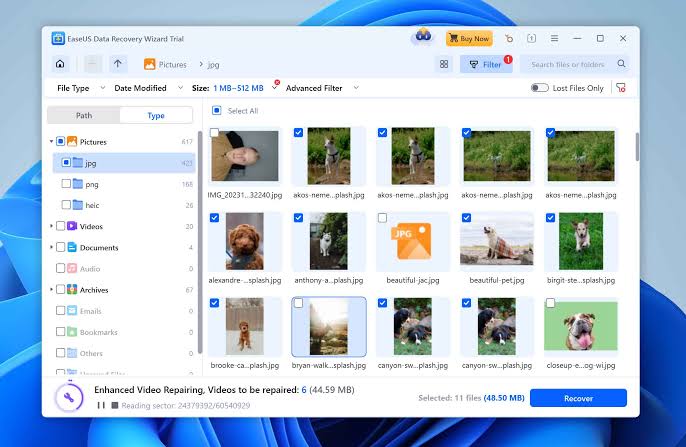
EaseUS remains one of the most popular picks for less technical users, thanks to its clean interface and consistently strong test results independent testing has recorded success rates as high as 99.7% on NTFS-formatted drives, with somewhat lower but still solid results on FAT32 and exFAT file systems, which are common on USB drives and SD cards. It also supports pausing and resuming scans and works with some simple RAID setups, which is more flexibility than most beginner-focused tools offer.
Pricing runs on a subscription model around $69.95 per month or roughly $149.95 for a lifetime license — which makes the lifetime option the more cost-effective route if you expect to need recovery software again down the line. The free version caps recovery at 2GB on Windows, with the Mac version generally limited to previewing files rather than full free recovery.
R-Studio Best for Technical and RAID Recovery
R-Studio consistently comes up as the top choice among IT professionals and technically confident users dealing with serious, structural recovery problems damaged partitions, RAID arrays, and unusual file systems that beginner-friendly tools simply aren’t built to handle. It supports an unusually wide range of operating systems and file systems, including Linux and older Windows versions, and includes disk imaging and RAID reconstruction capability.
The trade-off is usability its interface is considerably less polished than consumer tools like Disk Drill or EaseUS, and it assumes a level of technical comfort that casual users may find intimidating. For the right situation, though, it’s often the only tool capable of the job at all.

Recuva Best Free Option for Simple Windows Recovery
Recuva has built a long-standing reputation as a reliable, lightweight, completely free tool for Windows users dealing with straightforward accidental deletion. It offers unlimited free recovery, a portable version that doesn’t require installation, and a genuinely simple wizard mode for beginners.
It’s worth being realistic about its limitations, though independent testing has recorded its overall recovery success rate around 31%, noticeably below premium competitors, meaning it performs best on simple, recent deletions rather than more complex data loss scenarios. Its inexpensive premium tier adds features like virtual hard drive support and priority support, but even reviewers who recommend it are clear that it “can’t dig in quite as deeply as higher-priced data recovery software.” For a quick, no-cost first attempt at recovering a recently deleted file, it’s still a reasonable starting point.
Stellar Data Recovery Best for Everyday, Predictable Performance
Stellar has built a solid reputation for dependable, everyday recovery, and independent testing gives a fairly clear picture of where it performs best. In tests recovering files deleted from the Recycle Bin, Stellar recovered files without issue. On formatted drives, performance dropped to around half of missing files recovered, and on simulated corrupted hard drives, it recovered roughly 80% of missing files, completing scans in seconds. That pattern — excellent on simple deletion, solid on corruption, weaker on full formatting — is useful to know before choosing it for a specific situation.
Its paid subscriptions run on the pricier side, but its free version’s strong performance and user-friendly interface make it a reasonable pick for everyday needs even without upgrading.

PhotoRec Best Completely Free, Open-Source Option
For technically comfortable users who don’t want to pay anything at all, PhotoRec remains one of the most capable open-source options available. Despite the name, it recovers a wide range of file types, not just photos, and works across Windows, Mac, and Linux with support for many different file systems.
The catch is usability it runs through a command-line-style interface rather than a modern graphical one, which makes it considerably less approachable than paid alternatives. It’s a genuinely powerful tool, but best suited to users willing to follow technical instructions carefully rather than clicking through a guided wizard.
DMDE Best Budget Option for Deeper Recovery
DMDE stands out as a strong middle ground between free, simple tools and expensive, professional-grade software. Its free edition allows genuine recovery, not just previewing, though it caps each recovery operation at 4,000 files per folder, meaning larger recoveries need to be done in batches. Its paid Express license, priced around $9 per month, is a notably affordable option for a one-time recovery task, making it appealing for users who don’t want to commit to a full-priced lifetime license for a single incident.
What the Numbers Actually Tell Us
A few patterns show up consistently across independent testing that are worth keeping in mind regardless of which tool you choose. Recently deleted files from an otherwise healthy drive tend to have high recovery success rates, often in the 80 to 95% range, largely because the underlying data usually hasn’t been overwritten yet. Formatted drives and corrupted storage devices see meaningfully lower success rates, commonly in the 40 to 70% range, since more of the original file structure has typically been disrupted. Physical drive damage sits in a different category entirely software success rates there are unreliable at best, and professional recovery services become the more sensible option.
This is a useful reminder that no tool’s advertised “success rate” tells the full story on its own performance depends heavily on what actually caused the data loss in the first place, not just which software you picked.
Free vs. Paid: When the Upgrade Is Actually Worth It
Free tiers across these tools are genuinely useful for testing whether your files are recoverable at all, thanks to preview features that let you confirm files are intact before committing to anything. Where paid versions earn their price is in three areas: recovering larger volumes of data past the free cap, handling more complex scenarios like formatted drives or RAID arrays that need deeper scanning capability, and getting priority support when something more serious is on the line.
If you’re dealing with a small number of important files and a fairly simple deletion, it’s often worth trying the free tier of Disk Drill, EaseUS, or Recuva before spending anything. If you’re facing a larger volume of lost data, a formatted drive, or a more complex device setup, budgeting for a paid license upfront rather than discovering the free tier isn’t enough halfway through will likely save time and frustration.
The Bottom Line
There’s no single tool that objectively beats every other option in every category — that’s exactly why comparison, not just ranking, matters here. Disk Drill earns its reputation as the strongest all-around pick for most users. EaseUS is hard to beat for beginners and SD card recovery specifically. R-Studio remains the go-to for serious, technical RAID and partition problems. Recuva and PhotoRec cover the free end of the spectrum well, with DMDE offering a genuinely useful budget middle ground. The right choice comes down to matching these specific strengths and their real, tested limitations to your actual situation, rather than assuming the most popular name is automatically the right one for every job.
FAQs
Q1: Which data recovery software has the highest success rate overall? There isn’t one universal answer, since success rate depends heavily on the type of data loss. Tools like EaseUS and Disk Drill have shown strong results on straightforward deletions and NTFS drives specifically, but performance for any tool tends to drop meaningfully on formatted drives or corrupted storage compared to simple deletion scenarios.
Q2: Is it worth paying for data recovery software, or should I stick with free tools? It depends on your situation. For a small number of important files with straightforward deletion, free tiers of tools like Disk Drill, EaseUS, or Recuva are often sufficient. For larger data volumes, formatted drives, or more complex recovery needs, a paid license typically offers deeper scanning capability and higher recovery caps that make it worth the cost.
Q3: Why does the same software perform differently on different types of data loss? Recovery success depends heavily on how much of the original file structure survived. Recently deleted files are usually still mostly intact and easier to recover, while formatting or corruption disrupts more of that structure, making full recovery less reliable regardless of which software you use.
Q4: Is Recuva still worth using in 2026 given its lower success rate compared to competitors? For simple, recent accidental deletions, yes — it’s free, lightweight, and easy to use. For more complex recovery situations, its lower overall success rate compared to premium tools means a more capable option like Disk Drill or EaseUS is likely to perform better.
Q5: Do I need different software for Windows versus Mac? Not necessarily. Most major tools, including Disk Drill, EaseUS, R-Studio, and PhotoRec, support both Windows and Mac, though some specific features can be platform-limited — for example, Mac free tiers are often more restricted than their Windows counterparts. It’s worth checking platform-specific feature details before purchasing.