


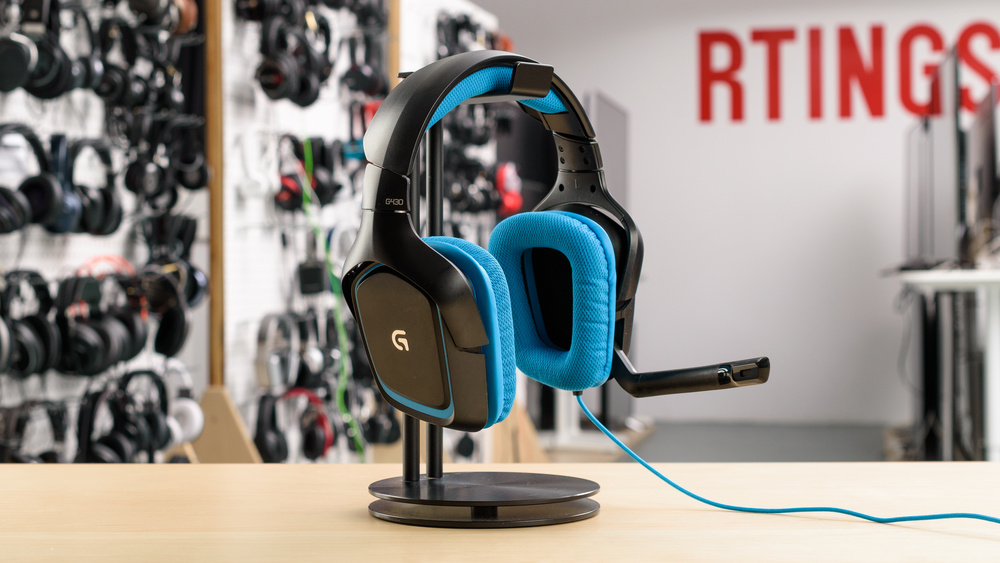
Immerse Yourself in 7.1 Surround Sound. The Lightweight Champion for PC, PS4, and Xbox.
What is the Logitech G430?
The Headset
The Logitech G430 is a wired, over-ear gaming headset featuring virtual 7.1 surround sound. It’s designed for gamers who want precise positional audio and all-day comfort without breaking the bank. It connects via USB for surround sound or 3.5mm for universal compatibility [citation:1][citation:7].
Relevance in 2025-2026
While newer models exist, the G430 remains a popular budget-friendly choice. Its lightweight design (255g) and proven 40mm drivers offer a reliable entry point for new gamers or those seeking a secondary headset. Its analog 3.5mm connection also ensures compatibility with modern consoles like PS5, Xbox Series X, and Nintendo Switch via the controller [citation:2][citation:10].
Who Is This For?
PC Gamers wanting to use Logitech Gaming Software [citation:3]. Console Players needing a wired headset with a clear mic. Value-Seekers looking for solid build quality and Dolby surround at an affordable price point. Also ideal for long streaming sessions thanks to its breathable fabric earcups [citation:5][citation:8].
Core Features of the G430
Dolby 7.1 Surround
Pinpoint enemy locations with virtual surround sound. The included USB adapter unlocks 7.1 audio on PC [citation:1][citation:9].
Noise-Canceling Mic
The flexible, rotating boom microphone filters out background noise for clear in-game communication [citation:4][citation:5].
Lightweight Design
At only 255 grams, it’s one of the lightest gaming headsets, reducing neck strain during marathon sessions [citation:2].
Washable Ear Pads
Sport-mesh fabric earcup covers are removable and machine washable, keeping your headset fresh and clean [citation:4].
Dual Connection
Comes with a 3.5mm cable for consoles/mobile and a USB adapter for 7.1 surround sound on PC [citation:1][citation:9].
On-Cable Controls
Easy-access volume dial and microphone mute switch right on the cable for quick adjustments [citation:1][citation:7].
Why Choose the G430?
✅ Superior Comfort
The lightweight frame and breathable fabric earcups allow for hours of comfortable gameplay without overheating or pressure points [citation:7][citation:10].
✅ Competitive Edge
Hear footsteps, gunfire, and environmental cues with clarity. The virtual 7.1 surround gives you a spatial awareness advantage [citation:9].
✅ Exceptional Value
With an average rating of 4.2/5 from over 4,000 reviews, it’s a proven performer that delivers premium features at a budget-friendly price [citation:8].
Perfect For…
PC Gaming
Full software customization with Logitech Gaming Software [citation:3].
Console Play
Works with PS4, PS5, Xbox One, and Switch via 3.5mm jack [citation:7].
Mobile Use
Great for music and videos on phones/tablets with a standard 3.5mm port.
Remote Work
Comfortable for long video calls with a clear, noise-canceling microphone.
Getting Started with Your G430
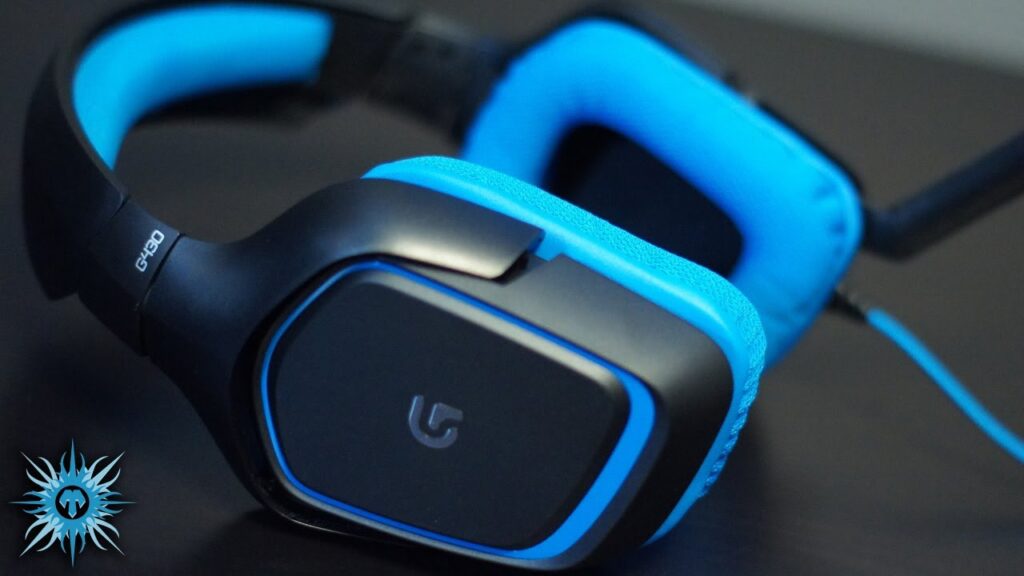

G430: Pros vs. Cons
✅ Pros
- ✔️ Excellent Comfort: Lightweight with breathable, washable ear pads [citation:2][citation:4].
- ✔️ Great Surround Sound: Dolby 7.1 via USB provides good spatial awareness [citation:9].
- ✔️ Versatile Connectivity: Works with PC via USB and consoles via 3.5mm [citation:1].
- ✔️ Clear Microphone: Noise-canceling mic delivers clear voice capture [citation:5].
- ✔️ High Value: Strong performance for its price point, backed by thousands of positive reviews [citation:8].
❌ Cons
- ✖️ Cheap Build Feel: Primarily plastic construction with some reports of creaking hinges [citation:2].
- ✖️ Non-Detachable Cable: The cable is permanently attached, which can complicate replacement if damaged [citation:2].
- ✖️ Bass Performance: Bass can sound a bit loose and less punchy compared to higher-end models [citation:2].
- ✖️ Outdated Software: Relies on older Logitech Gaming Software, not the newer G Hub [citation:1].
Frequently Asked Questions
1. Does the G430 work on PS5?
Yes, it works via the 3.5mm jack on the PS5 controller, providing stereo audio. USB connection for 7.1 surround is limited to PC.
2. How do I get 7.1 surround sound?
You must use the included USB adapter and connect it to a PC. The Logitech Gaming Software is required to activate and configure the surround sound [citation:3][citation:9].
3. Can I wash the ear pads?
Yes! The fabric ear pads are removable and can be gently washed with soap and water. Let them air dry completely before reattaching [citation:4].
4. Is the microphone removable?
No, the microphone is permanently attached but it rotates up and out of the way when not in use. It mutes automatically when flipped up [citation:9].
5. Does it work on Xbox One?
Yes, it works with Xbox One controllers that have a 3.5mm headphone jack. For older controllers, you may need the Xbox One Stereo Headset Adapter.
6. What software do I need?
You need the Logitech Gaming Software (LGS), version 8.45 or later, available on the Logitech support site [citation:1].
7. What are the driver sizes?
The G430 is equipped with 40mm neodymium drivers, which are standard for gaming headsets in this class [citation:5].
8. How long is the cable?
The cable is 2.33 meters (7.65 feet) long, providing plenty of freedom of movement from your PC or console [citation:1].
9. Is it compatible with Mac?
The headset will work via 3.5mm, but the 7.1 surround sound and software customization are only supported on Windows.
10. How does it compare to the HyperX Cloud?
The G430 is lighter and features virtual surround sound, while the HyperX Cloud is often praised for its superior build quality and materials [citation:2].
Ready to Upgrade Your Game Audio?
Join thousands of satisfied gamers who trust the G430 for its comfort and sound.
Looking for Logitech G Software?
Download the latest Logitech Gaming Software to unlock the full potential of your G430.
Final Verdict: Is the G430 Right for You?
The Logitech G430 remains a compelling option for budget-conscious gamers in 2025. It successfully blends long-term comfort with immersive 7.1 surround sound that can give you a competitive edge. While its all-plastic build and non-detachable cable show its age, its lightweight design and versatile compatibility (PC, PS5, Xbox) make it a fantastic all-rounder [citation:2][citation:10].
If you prioritize comfort and positional audio above premium materials, the G430 is a proven, reliable workhorse backed by over a decade of positive user feedback. It’s a testament to Logitech’s ability to deliver core gaming essentials without breaking the bank.
Experience your games like never before. Grab the Logitech G430 and hear the difference!
Don’t just play the game—feel every moment.