



Unlock Blazing-Fast Speed, Unbreakable Privacy, and Universal Compatibility for Your Digital Traffic.
What is a SOCKS5 Proxy?
The Protocol
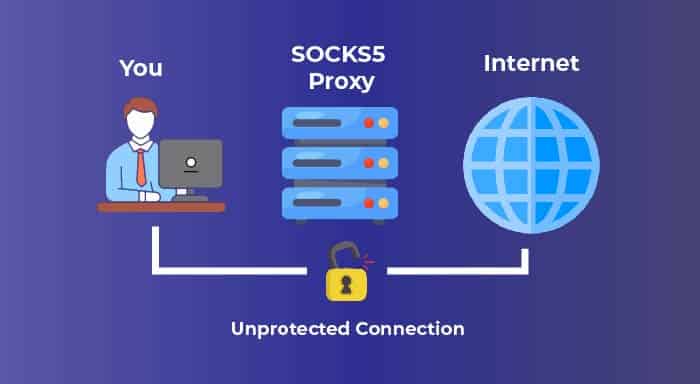
SOCKS5 is the latest version of the SOCKS (Socket Secure) internet protocol. It acts as a lightweight, generic proxy that routes your traffic through a remote server, completely masking your real IP address. Unlike HTTP proxies, it is application-agnostic, meaning it can handle any type of traffic (web, email, P2P, gaming) without caring what the data is .
Why It Matters in 2025–2026
With ISP tracking becoming more invasive and geo-blocks tightening globally, a standard VPN isn’t always the answer. SOCKS5 proxies are prized for their speed (no encryption overhead), ability to handle UDP traffic (perfect for streaming and gaming), and their flexibility in bypassing firewalls without the bulk of a full VPN tunnel .
Who This Is For
Torrent Users • Privacy Enthusiasts • Gamers • Web Scrapers • Digital Nomads • Developers • Streaming Fans – Anyone needing a fast, lightweight, and protocol-agnostic way to mask their online presence or access geo-restricted content .
Core Features of SOCKS5
Superior Speed
Because SOCKS5 doesn’t inherently encrypt your traffic (unlike a VPN), it introduces very little latency. This makes it up to 35% faster than encrypted HTTP proxies or VPNs, ideal for bandwidth-intensive tasks .
UDP Support
Unlike its predecessor SOCKS4, SOCKS5 supports UDP (User Datagram Protocol). This is critical for real-time applications like online gaming, video conferencing, and live streaming where speed is more important than perfect reliability .
Authentication
SOCKS5 includes built-in authentication methods, allowing proxy servers to verify users before granting access. This adds a layer of security, ensuring only authorized clients can use the proxy .
Protocol Agnostic
It doesn’t care if the traffic is HTTP, FTP, SMTP, or BitTorrent. SOCKS5 simply forwards packets, making it universally compatible with almost any internet application .
IP Masking
Your real IP address is completely hidden from the destination server. It only sees the IP of the SOCKS5 proxy server, providing a solid base for online anonymity .
Firewall Bypass
By routing traffic through an external server, SOCKS5 can effectively bypass network firewalls and content filters that restrict access based on IP or protocol .
Why Choose a SOCKS5 Proxy?
✅ Lightning Speed
No heavy encryption means lower latency. Perfect for gaming, streaming 4K video, and large downloads where every millisecond counts .
✅ Universal Compatibility
Works with email clients, torrent software, web browsers, and even SSH. If it connects to the internet, SOCKS5 can proxy it .
✅ Enhanced Privacy
Hide your real IP from trackers, advertisers, and malicious actors. Combine with HTTPS for a solid privacy layer .
Perfect for These Scenarios

Online Gaming
Reduce DDoS risks and find optimized routing paths to game servers. UDP support makes SOCKS5 ideal for real-time action .
P2P & Torrenting
Mask your real IP while using BitTorrent. SOCKS5 is the preferred proxy for privacy-focused file sharing .
Streaming
Watch Netflix, Hulu, or BBC iPlayer libraries from other regions without the slowdown of a full VPN tunnel .
Web Scraping
Rotate IPs to gather data from e-commerce sites, search engines, and social media without getting blocked .
Email Security
Route your email client (SMTP/IMAP) through a proxy to mask your location and add an extra layer of obscurity.
Public Wi-Fi Safety
Route traffic through a trusted SOCKS5 proxy when using unsecured cafe or airport Wi-Fi to hide your IP from local snoopers.
How to Set Up a SOCKS5 Proxy in 6 Steps
Choose a Provider
Select a reputable SOCKS5 proxy service. You can choose free public proxies (risky, slow) or a paid provider for speed, reliability, and no-logs policies .
Get Proxy Details
After subscribing, you’ll receive the proxy address (IP or hostname), port number (commonly 1080), and a username/password for authentication .
Configure Your Application
Open the settings of your target app (e.g., qBittorrent, Firefox, Telegram). Look for ‘Connection’, ‘Network’, or ‘Proxy’ settings and select SOCKS5 .
Enter Proxy Credentials
Input the server address, port, and your username/password. Ensure ‘SOCKS5’ is selected as the proxy type, and check boxes for ‘Proxy DNS’ if available .
Test Your Connection
Visit a site like WhatIsMyIP.com. It should now display the proxy server’s IP address, not your real one. Check for DNS leaks as well .
System-Wide Setup (Optional)
On Windows/macOS, you can set a system-wide proxy in Network Settings. Use tools like Proxifier to force applications without native proxy support through SOCKS5 .
SOCKS5 vs. VPN vs. HTTP Proxy
✅ SOCKS5 Advantages
- ✔️ Speed: Faster than VPNs due to no encryption overhead .
- ✔️ Flexibility: Handles any traffic (TCP/UDP), unlike HTTP proxies .
- ✔️ Better for P2P: Many VPNs block torrenting; SOCKS5 is ideal .
- ✔️ Low Resource: Lightweight, works on low-power devices .
❌ SOCKS5 Limitations
- ✖️ No Encryption: Data is not encrypted between you and the proxy (use with HTTPS!) .
- ✖️ Application-Level: Must configure each app individually, or use a wrapper .
- ✖️ Potential Leaks: DNS requests may leak if not routed through the proxy .
- ✖️ Free Proxies Risky: Public SOCKS5 proxies are often slow, unreliable, or malicious .
Ready to Experience True Internet Freedom?
Ditch the lag and geo-blocks. Get a premium SOCKS5 proxy for blazing speed and total IP protection.
Starting from $2/month • No-logs policies • 24/7 support
Frequently Asked Questions
1. Is SOCKS5 faster than a VPN?
Generally, yes. SOCKS5 proxies don’t encrypt your traffic, so they add less overhead. A VPN encrypts everything, which can slow things down slightly. For speed-critical tasks like gaming, SOCKS5 often wins .
2. Is SOCKS5 secure?
It provides anonymity by hiding your IP, but it does not provide confidentiality. Your data isn’t encrypted. It’s best used in combination with HTTPS (the padlock in your browser) which does encrypt the data itself .
3. What is the difference between SOCKS4 and SOCKS5?
SOCKS5 supports UDP traffic and various authentication methods, while SOCKS4 does not. For modern applications like streaming and gaming, SOCKS5 is essential .
4. Can I use a free SOCKS5 proxy?
Technically yes, but it’s risky. Free proxies are often overcrowded, slow, and may log your data or inject ads. For anything sensitive, a paid, reputable provider is highly recommended .
5. Does SOCKS5 work with Netflix?
It can, but Netflix actively blocks many proxy IPs. A dedicated residential SOCKS5 proxy has a better chance of working than a datacenter one .
6. What is a SOCKS5 proxy used for most?
It is most popular for P2P file sharing (torrenting) due to its speed and ability to handle high volumes of traffic, as well as for online gaming where low latency is critical .
7. How do I find my SOCKS5 proxy address?
You don’t ‘find’ your own. You get it from a proxy service provider. It looks like an IP address (e.g., 123.45.67.89) or a hostname (e.g., proxy.provider.com) with a specific port number .
8. What port does SOCKS5 use?
The default port for SOCKS5 is 1080, but providers may use any port (e.g., 1085, 2020). You must use the specific port provided in your service details .
9. Can I use SOCKS5 on my phone?
Yes. Android and iOS allow you to configure a SOCKS5 proxy in the Wi-Fi settings, or you can use apps that support proxy connections .
10. Will a SOCKS5 proxy hide my torrenting activity from my ISP?
It hides the destination IP (the torrent peers see the proxy’s IP), but your ISP can still see you are connected to a proxy. It does not hide the fact that you are using bandwidth, nor does it encrypt the torrent data itself .
For Developers & Scrapers 👨
Need rotating residential SOCKS5 proxies for large-scale data extraction? Integrate via API or use our proxy manager tools.
The Verdict on SOCKS5 in 2026
SOCKS5 is the workhorse of the proxy world. It may not have the marketing glamour of a VPN, but its raw speed, protocol flexibility, and lightweight nature make it the preferred tool for specific, high-performance tasks .
For the gamer seeking lower ping, the torrent user wanting IP privacy, or the developer scraping public data, SOCKS5 is often the superior choice. Remember its limitations—lack of encryption means you must pair it with HTTPS for security—and always opt for a paid, no-logs provider for peace of mind .
“SOCKS5 is to internet traffic what a Swiss Army Knife is to tools—versatile, reliable, and indispensable for the right job.” — Network Engineer
Take control of your digital footprint today.