
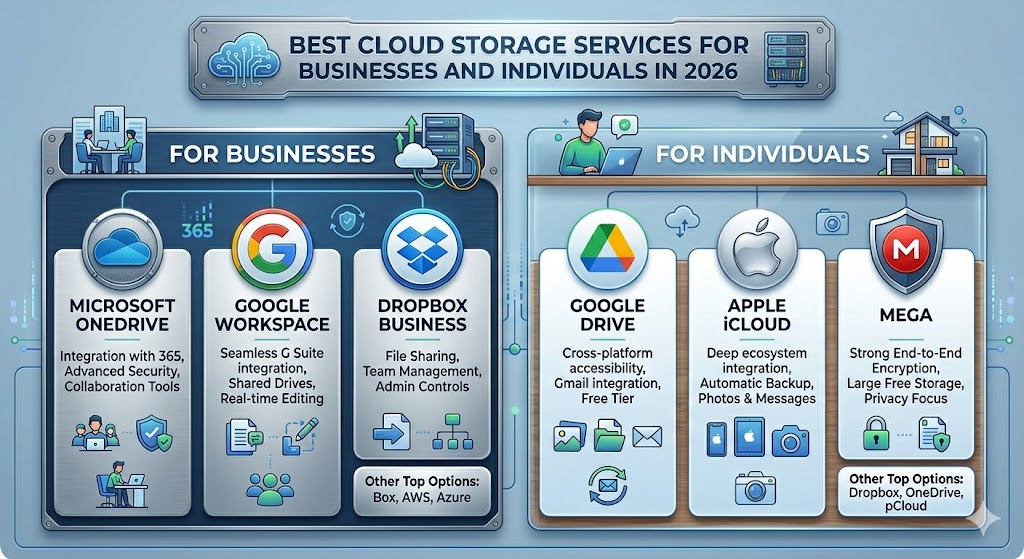
In 2026, data has become one of the most valuable assets in the digital world. From personal photos and videos to enterprise-level business files, everything is stored and shared digitally.Cloud storage services have become essential for both individuals and organizations. People no longer rely solely on physical hard drives or USB devices.Today, cloud storage offers flexibility, security, scalability, and remote access from anywhere. Whether you’re a student, freelancer, small business owner, or part of a large enterprise, picking the right service can boost productivity and improve data management.Here, we explore the best cloud storage options for businesses and individuals in 2026 their features, benefits, and when they work best.
What Is Cloud Storage?
Cloud storage lets you save data on remote servers you can reach through the internet, rather than keeping it on your own device.These servers are run by cloud service providers and let you upload files, store documents, share data, access your files from anywhere, and sync across all your devices.
Why Cloud Storage Is Important in 2026
Our digital lives today demand both flexibility and security.You can access your files from anywhere, as long as you have an internet-connected device.Advanced encryption keeps sensitive information safe from prying eyes.Need more space? Storage grows with your needs.Teams get to collaborate in real-time, making projects smoother.And if hardware fails, cloud storage helps you recover without losing data.
Key Features to Look for in Cloud Storage
Before picking a provider, keep these features in mind:
1. Security & Encryption
Look for end-to-end encryption to keep your data safe.
2. Storage Capacity
Choose plans that fit your needs, whether you’re an individual or a business.
3. File Sharing
Make sure sharing is simple and lets you control permissions.
4. Synchronization
Your files should sync automatically across all your devices.
5. Integration
Check if it works smoothly with tools like Google Workspace or Microsoft Office.
6. Version Control
It should let you recover older versions of your files when needed.
Best Cloud Storage Services in 2026
1. Google Drive
Google Drive is still one of the most popular cloud storage options out there.
It offers 15GB of free storage and integrates well with Google Workspace. You can collaborate in real time and enjoy strong search features.
Best For:
Individuals, students, and small businesses.
Pros:
Easy to use
Great collaboration tools
Free tier available
Cons:
Limited free storage
Some users worry about privacy
2. Microsoft OneDrive
OneDrive works seamlessly with Microsoft Office tools.
It includes file versioning, a personal vault for security, and automatic backups.
Best For:
Businesses that rely on the Microsoft ecosystem.
Pros:
Tight productivity integration
Reliable syncing
Good business plans
Cons:
You need a Microsoft account to use it
3. Dropbox
Dropbox stands out for its simplicity and quick syncing.
Features:
Smart sync
File recovery
Collaboration tools
Cross-platform support
Best For:
Professionals and creative teams.
Pros:
Fast file syncing
Easy sharing
Reliable performance
Cons:
Limited free storage
4. iCloud Drive
Apple’s cloud storage solution shines with tight integration.
Features:
Apple device integration
Automatic backups
File syncing across Apple devices
Best For:
Apple users.
Pros:
Smooth Apple ecosystem integration
Simple interface
Cons:
Limited cross-platform flexibility
5. pCloud
pCloud offers secure, privacy-focused cloud storage you can trust.
It provides lifetime storage plans and strong encryption to keep your files safe. Plus, it supports media playback and file versioning.
Best For:
Users who care deeply about privacy.
Pros:
High security
Affordable lifetime plans
Cons:
Fewer integrations compared to other services
6. Sync.com
Sync.com puts a big emphasis on privacy and security.
Features:
Zero-knowledge encryption
Secure file sharing
It also offers backup tools and collaboration features.
Best For:
Businesses that deal with sensitive data.
Pros:
Very secure
Strong privacy protection
Cons:
A bit slower performance
7. MEGA
MEGA stands out for its generous free storage and solid encryption.
Features:
End-to-end encryption
20GB+ free storage
File sharing
Chat integration
Best For:
Individuals and small teams.
Pros:
Large free plan
Strong privacy features
Cons:
Limited business tools
8. Amazon Drive / AWS Cloud Storage
Amazon offers cloud storage solutions designed for enterprises.
The service scales up easily and comes with strong security measures.
It also integrates AI features and supports enterprise backup needs.
Best For:
Large enterprises.
Pros:
Very scalable
Reliable infrastructure
Cons:
Pricing can be complicated
9. Box
Box focuses on enterprise collaboration.
Features:
Advanced file management
Workflow automation
It also offers strong security compliance and integrates well with enterprise apps.
Best For:
Large businesses and corporations.
Pros:
Robust business features
High security standards
Cons:
Expensive for individual users
10. IDrive
IDrive focuses primarily on backup in the cloud storage world.
It offers multi-device backup and disk image backup, along with file syncing and data recovery options.
Best For:
Users and businesses that rely heavily on backups.
Pros:
It packs strong backup features and comes at an affordable price.
Cons:
The interface feels a bit outdated.

Cloud Storage Comparison Table
Service |
Best For |
Strength |
|---|---|---|
Google Drive |
Individuals |
Collaboration |
OneDrive |
Businesses |
Microsoft integration |
Dropbox |
Professionals |
Speed |
iCloud |
Apple users |
Ecosystem sync |
pCloud |
Privacy users |
Lifetime plans |
Sync.com |
Security |
Encryption |
MEGA |
Free storage |
Privacy |
AWS |
Enterprises |
Scalability |
Box |
Corporates |
Workflow tools |
IDrive |
Backup |
Data recovery |
Benefits of Cloud Storage
1. Improved Accessibility
You can access your files anytime and from anywhere.
2. Better Collaboration
Teams get to work together in real-time, making projects smoother.
3. Enhanced Security
Data stays safe with encryption and regular backups.
4. Cost Efficiency
You don’t have to invest in physical storage hardware.
5. Disaster Recovery
It helps prevent permanent data loss when things go wrong.
AI in Cloud Storage (2026 Trend)
AI is shaking up cloud storage systems in pretty exciting ways.
Some key AI features include smart file organization and automatic tagging. It also offers predictive storage usage, advanced search, and security threat detection.
How to Choose the Right Cloud Storage
For personal use, options like Google Drive, MEGA, and iCloud stand out.
Businesses often go for OneDrive, Box, or Google Workspace.
If security is your top priority, Sync.com and pCloud are solid picks.
For backup needs, IDrive and AWS are reliable choices.
Common Mistakes to Avoid
1. Ignoring Security Features
Always check the encryption standards before committing.
2. Choosing Only Free Plans
Free plans can be tempting but often come with serious limits.
3. Not Checking Integration
Make sure your cloud storage works well with the tools you already use.
Future of Cloud Storage
Cloud storage is expected to evolve with fully AI-managed storage systems. Blockchain-based secure storage will also play a bigger role.We’ll see faster edge computing integration soon. Unlimited scalable storage plans are becoming the norm.Advanced automation features will continue to improve user experience.Cloud storage services have become essential in 2026 for both individuals and businesses. With growing data demands, picking the right platform matters for security, accessibility, and efficiency.From Google Drive and Dropbox to enterprise solutions like AWS and Box, each service offers unique benefits depending on what users need.The future of cloud storage looks smarter, faster, and more secure—powered by AI and automation.
FAQs
What is cloud storage?
Cloud storage lets you save data on remote servers that you can access over the internet.
Which is the best cloud storage in 2026?
Google Drive, OneDrive, Dropbox, and pCloud rank among the top options.
Is cloud storage safe?
Yes, most providers use encryption along with strong security measures.
Can cloud storage be used for business?
Absolutely, many platforms cater specifically to business needs.
What is the future of cloud storage?
Expect AI-driven automation and storage systems that scale without limits.
