

Gaming has come a long way, evolving from cartridges and discs to digital downloads and emulators. One of the most exciting developments for fans of Nintendo’s Wii U console is the Cemu Emulator. This powerful emulator allows players to enjoy their favorite Wii U titles on modern devices like PC, Android, and iOS without needing the original console.
For gamers who never owned a Wii U but still want to play classics like The Legend of Zelda: Breath of the Wild, Mario Kart 8, or Super Smash Bros. for Wii U, the Cemu Emulator makes it possible. In this guide, we’ll explore everything you need to know about downloading and using Cemu Emulator on different platforms,
What Is Cemu Emulator?
Cemu Emulator is a software application designed to replicate the Nintendo Wii U gaming environment on other devices. By simulating the Wii U’s hardware and operating system, Cemu allows you to play original game files, known as ROMs or ISOs, on computers and mobile devices.
Developed by a dedicated team of programmers, Cemu has gained popularity because of its stability, speed, and compatibility with a wide library of Wii U games. Unlike older emulators that often struggled with graphics or performance, Cemu offers smooth gameplay with features like 4K resolution support, shader cache, modding, and controller customization.
Key Features of Cemu Emulator
Cemu Emulator has earned a strong reputation among gamers because of its unique set of features.
-
Wide Game Compatibility: Supports a large number of Wii U titles including Zelda, Mario, Smash Bros, and more.
-
High Resolution Graphics: Play games in 1080p or even 4K for enhanced visuals compared to the original console.
-
Controller Support: Works with Wii U controllers, Xbox, PlayStation, and keyboard/mouse setups.
-
Shader Cache System: Improves performance and reduces stuttering in graphics-heavy games.
-
Regular Updates: Developers frequently release new versions with bug fixes and performance improvements.
-
Mods and Cheats: Players can enhance games with mods, custom graphics packs, and cheat codes.
-
Cross-Platform Support: Works on Windows PC officially, with experimental builds for Android and iOS.
Why Use Cemu Emulator?
There are many reasons gamers prefer emulators like Cemu:
-
Preserve Gaming History: Some Wii U games are no longer sold or are difficult to find. Cemu helps keep these games alive.
-
Improved Performance: Many Wii U games run better on modern PCs than on the original hardware.
-
Portable Gameplay: Play your favorite Wii U titles on your laptop or even mobile devices.
-
Customization: Adjust graphics, controls, and mods for a personalized experience.
-
Cost Savings: Instead of buying old hardware, gamers can enjoy Wii U titles directly on their current devices.
System Requirements for Cemu Emulator on PC
To ensure smooth gameplay, make sure your system meets these requirements:
Component |
Minimum Requirement |
Recommended Requirement |
|---|---|---|
OS |
Windows 7 (x64) |
Windows 10/11 (x64) |
Processor |
Intel/AMD Dual-Core |
Intel i5/i7 or AMD Ryzen |
RAM |
4 GB |
8 GB or more |
Graphics Card |
OpenGL 4.1 compatible |
NVIDIA GTX 1060 / AMD RX 580 or better |
Storage |
10 GB free space |
SSD for faster loading |
How to Download and Install Cemu Emulator on PC
Follow these steps for installation:
-
Visit the Official Website
Go to the official Cemu website or a trusted mirror to download the latest version. -
Download the Zip File
Choose the Windows version and extract the files to a new folder. -
Install Required Files
-
Install C++ Redistributable Packages
-
Update graphics drivers
-
Ensure you have the latest DirectX version
-
-
Run Cemu.exe
Launch the executable file to start the emulator. -
Configure Settings
-
Set up input (controller/keyboard)
-
Adjust graphics packs
-
Load shader caches if available
-
-
Load Wii U Games
Import your legally owned game files and start playing.
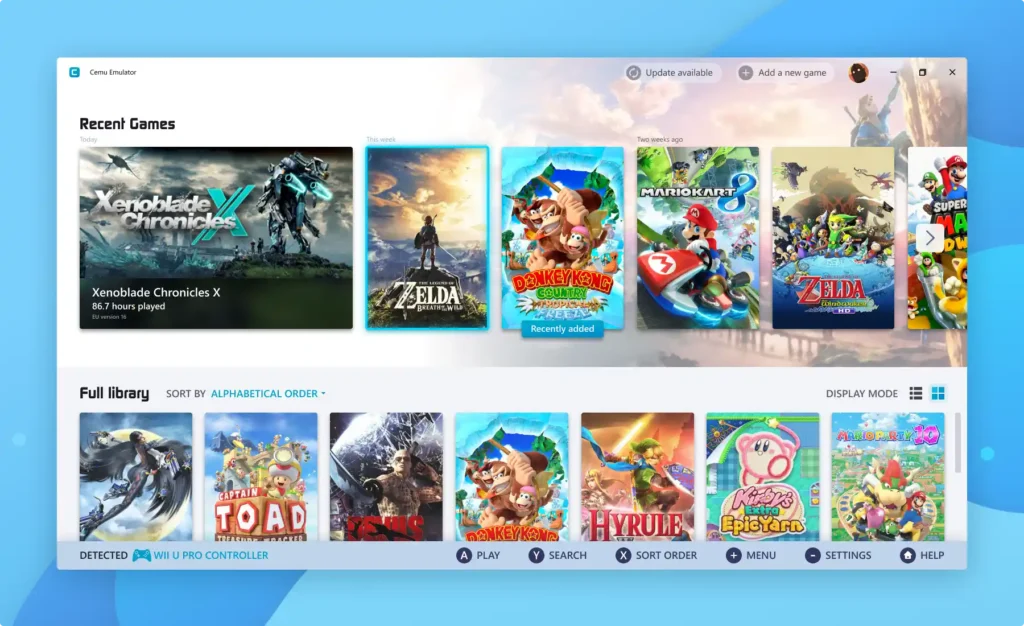
Cemu Emulator on Android
While the official Cemu Emulator is built for Windows PC, there are community efforts and unofficial Android ports that allow limited Wii U game compatibility on smartphones.
Steps to Install on Android
-
Download APK File from a trusted community source.
-
Enable Unknown Sources in device settings.
-
Install and Open App.
-
Load Game ROMs stored on your device.
-
Adjust Performance Settings for smoother gameplay.
Cemu Emulator on iOS (iPhone and iPad)
Running emulators on iOS is more challenging due to Apple’s restrictions. However, with third-party app stores and sideloading, it is possible to run Cemu-like ports.
Steps to Install on iOS
-
Download Cemu Emulator IPA File from a trusted source.
-
Use AltStore or Cydia Impactor to sideload the app.
-
Trust Developer Profile in iOS settings.
-
Launch Emulator and import Wii U games.
Best Wii U Games to Play on Cemu Emulator
Here are some of the top Wii U titles you can enjoy with Cemu:
Game Title |
Genre |
Performance on Cemu |
|---|---|---|
The Legend of Zelda: Breath of the Wild |
Adventure |
Excellent |
Super Mario 3D World |
Platformer |
Excellent |
Mario Kart 8 |
Racing |
Excellent |
Super Smash Bros. for Wii U |
Fighting |
Excellent |
Pikmin 3 |
Strategy |
Very Good |
Bayonetta 2 |
Action |
Very Good |
Tips for Better Performance on Cemu Emulator
-
Use Graphics Packs to improve visuals and resolution.
-
Download Shader Caches to reduce stuttering.
-
Enable Async Shader Compilation for smoother rendering.
-
Allocate More RAM in settings for demanding games.
-
Keep Emulator Updated with the latest patches.
Is Cemu Emulator Legal?
Yes, emulators like Cemu are legal to download and use. However, downloading or distributing copyrighted game ROMs illegally is not. To stay safe and legal:
-
Dump your own Wii U games from original discs.
-
Avoid pirated ROM sites.
-
Use the emulator responsibly for preservation and personal use.
Advantages and Disadvantages of Cemu Emulator
Advantages |
Disadvantages |
|---|---|
Play Wii U games on PC, Android, and iOS |
Requires high-end PC for best performance |
4K graphics support |
Mobile versions are less stable |
Free to use |
ROM legality concerns |
Controller customization |
Some games may have bugs or glitches |
Frequent updates |
Complex setup for beginners |
Alternatives to Cemu Emulator
If you are exploring other options, here are some alternatives:
-
Dolphin Emulator – Best for GameCube and Wii games.
-
RetroArch – Multi-platform emulator supporting many consoles.
-
Yuzu Emulator – For Nintendo Switch games.
-
RPCS3 – For PlayStation 3 titles.
Frequently Asked Questions (FAQs)
Is Cemu Emulator free?
Yes, it is completely free to download and use.
Can I play all Wii U games on Cemu?
Most popular titles are supported, though a few may have bugs.
Does Cemu support online multiplayer?
Yes, some games work with online servers, but compatibility may vary.
Can I use Cemu on Mac?
Officially no, but you can run it using Bootcamp or virtualization.
Do I need a powerful PC?
For the best experience, a mid-to-high-end PC is recommended.
Conclusion
The Cemu Emulator has opened the door for millions of gamers to experience Wii U classics without owning the original console. Whether you’re playing on a Windows PC, experimenting on Android, or sideloading on iOS, this emulator delivers an impressive gaming experience with enhanced graphics and customization.
While mobile versions are still experimental, the PC version of Cemu is stable and offers nearly perfect compatibility with the majority of Wii U titles. By following legal practices and optimizing settings, you can transform your computer or smartphone into a powerful Wii U gaming hub.
In short, Cemu Emulator Free Download on PC, Android, and iOS is the ultimate way to revisit Nintendo’s unforgettable Wii U library faster, clearer, and more accessible than ever before.
