
If you sell on Etsy, run a print-on-demand shop, or make Cricut projects, you already know the drill. Every product photo needs a clean background. Every design needs to be a sharp, print-ready resolution. And most of the tools that do this well want you to upload your files to a cloud server, buy credits, or sign up for yet another subscription.
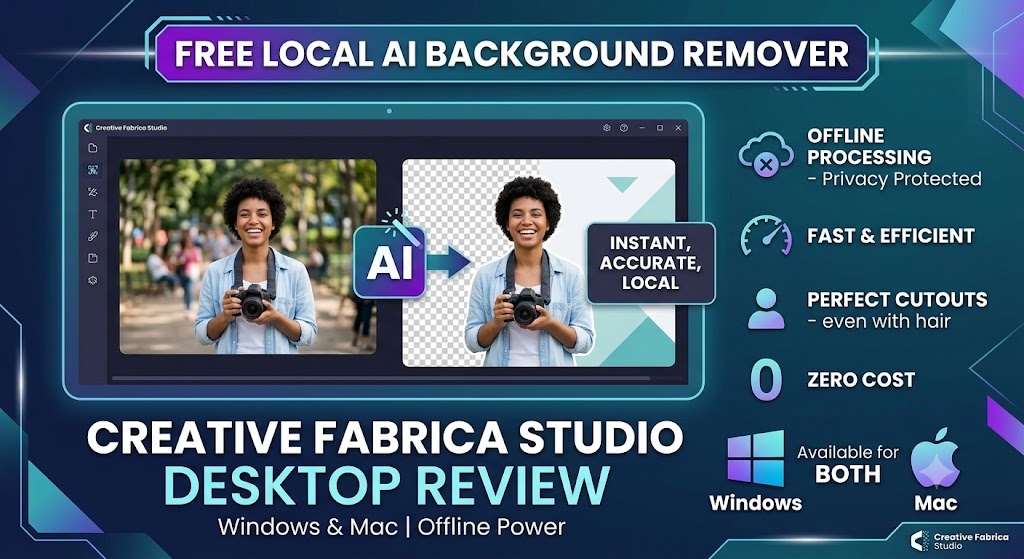
That’s the exact problem Creative Fabrica just tried to solve with a new release: Creative Fabrica Studio Desktop, a free desktop app for Windows and Mac that brings local AI tools background removal, image upscaling, image generation, and text-to-speech directly to your computer. I installed it, ran it through a real workflow, and here’s what I found.
The Problem: Cloud Tools Aren’t Always the Answer
Most background removers and upscalers today run entirely in the cloud. That usually means:
- Uploading every single image, one at a time, to someone else’s server
- Paying per credit or hitting a monthly limit
- Slower turnaround if you’re processing dozens of product photos
- Less control over where your design files actually go
For Etsy sellers, POD creators, and Cricut crafters who process a lot of images in batches, this adds up fast both in time and in cost. That’s the gap Creative Fabrica is aiming to fill with a free desktop AI tools for creators approach.
What Is Creative Fabrica Studio Desktop?
Creative Fabrica Studio Desktop is a Windows and Mac app that lets you use the Creative Fabrica Studio toolset alongside AI models installed directly on your own machine. Once you install a supported model, tools like background removal and upscaling can run locally on your computer instead of relying purely on the cloud.
To be fair to how the app actually works: not every single feature is guaranteed to run offline forever, and some workflows may still touch your Creative Fabrica account. But for the core tools background removal and upscaling after the model is downloaded, they can process images locally, which is the main selling point here.
Setup is simple: download the installer for your OS, run it, and let it walk you through installing the local models. On Windows, you might see a security prompt during install — this is normal for newer, less widely distributed apps, and it goes away as more people install it. Just click “More info,” then “Run anyway,” and you’re set.
Why Local AI Tools Actually Matter
Once it’s installed, the appeal becomes obvious:
- No repeated uploads. You’re not sending every image to a server just to remove a background.
- No credit system for local tools. You install once, then use them as much as you need.
- Better for privacy-conscious workflows. Your design files and product photos stay on your machine.
- Useful when your internet is slow or unreliable. Local processing doesn’t depend on your upload speed.
- Built into your existing workflow. It’s part of the Creative Fabrica Studio experience, not a separate tab you have to juggle.
For anyone editing more than a handful of images a week, that combination free, local, unlimited is hard to ignore.
Hands-On: Cleaning Up an Etsy Product Photo
To actually test this, I ran a real Etsy-style product photo through the app.
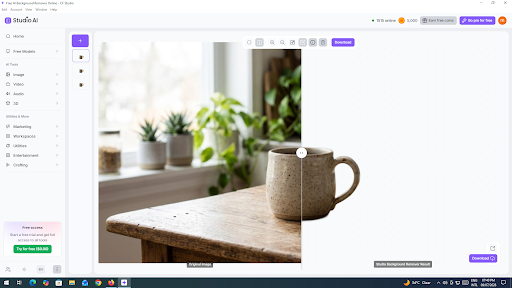
The workflow looked like this:
- Open Creative Fabrica Studio Desktop and load the local background removal tool.
- Drop in a product photo shot on a plain backdrop.
- Let the local model process it — no upload progress bar, no waiting on a server queue.
- Export a clean, transparent PNG ready for an Etsy listing or a Cricut project.
I also ran a lower-resolution design through the upscaler to see how it handled print-quality output, which is a common pain point for POD sellers prepping designs for larger print sizes. The result was noticeably sharper without needing to send the file anywhere.
Who Should Actually Use This?
Based on what it does well, this app is worth trying if you’re:
- An Etsy seller who needs clean, consistent product photos
- A print-on-demand seller prepping designs for print-quality output
- A Cricut or sublimation creator who regularly needs transparent PNGs
- A digital product seller or designer who wants more control over local files
- A small business owner or content creator doing your own image editing without a dedicated design team
Pros and Limitations
No tool is perfect, so here’s the honest breakdown.
Pros:
- Genuinely free no credit card, no paid tier required for the core tools
- Works on both Windows and Mac
- Local processing for background removal and upscaling means faster, private workflows
- Fits directly into the Creative Fabrica Studio ecosystem
- No per-image credit system once models are installed
Limitations:
- Performance depends on your computer’s hardware — older machines will be slower
- You do need to download the AI models before first use, which takes a bit of setup time
- Some features may still require an internet connection or a Creative Fabrica account depending on the workflow
- As a newer release, expect occasional rough edges as it matures
Overall, the trade-offs are reasonable for what you get, especially compared to paying per credit on cloud-only alternatives.
Frequently Asked Questions
Is Creative Fabrica Studio Desktop free? Yes. The app itself, along with the background remover, upscaler, image generation, and text-to-speech tools, is free to use with no credit card required.
Does the background remover run locally? Yes, once the local model is installed, background removal can run directly on your computer instead of through a cloud upload.
Does it work on Windows? Yes, there’s a dedicated Windows installer. You may see a one-time security prompt during setup, which is normal.
Does it work on Mac? Yes, a Mac version is available alongside the Windows build.
Can I use it for Etsy product photos? Yes, it’s a solid fit for cleaning up backgrounds and prepping product photos for Etsy listings.
Can I use it for print-on-demand designs? Yes, the upscaler is particularly useful for bringing lower-resolution designs up to print-ready quality.
Can I make transparent PNG files for Cricut? Yes, the background removal tool exports transparent PNGs suitable for Cricut and similar cutting projects.
Is it an alternative to cloud background removers? For the supported local tools, yes — it removes the need to upload images to a separate cloud service for basic background removal and upscaling.
Do I need an internet connection? You’ll need one to download the app and the AI models initially. After that, supported local tools can run without a constant connection, though some account-related features may still need one.
Are my images uploaded anywhere? For the local tools, processing happens on your own computer rather than being sent to an external server.
Final Thoughts
If you’re tired of uploading product photos one by one or hitting credit limits on cloud tools, Creative Fabrica Studio Desktop is worth installing, especially since it costs nothing to try. It’s not going to replace every cloud-based tool overnight, but for background removal and upscaling two of the most common tasks for Etsy, POD, and Cricut creators having a free, local, unlimited option is a genuinely useful addition to the toolkit.
You can grab the free AI image upscaler for desktop and try it on your own designs to see how it fits into your workflow.
