
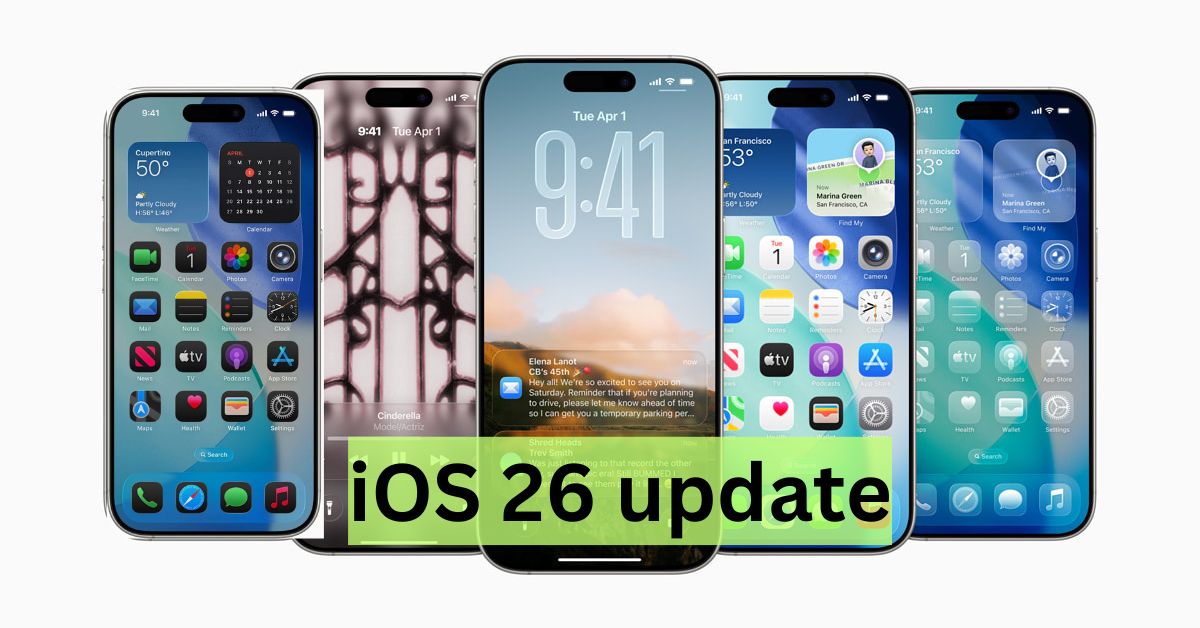
Apple has officially rolled out iOS 26, the latest update to its iPhone and iPad operating systems. Announced at WWDC 2025 and released on September 15, 2025, iOS 26 introduces a redesigned interface, smarter AI features, and several app enhancements that reshape how users interact with their devices. This article explores the most important aspects of iOS 26: its key features, device compatibility, and what users should expect when upgrading.
A Fresh Look: Liquid Glass Design
One of the most noticeable changes in iOS 26 is the Liquid Glass design language. Apple has re-imagined the interface with translucent, glass-like surfaces that give apps, menus, and system panels a fluid, modern feel. While visually striking, Apple has adjusted transparency and contrast throughout the beta phase to maintain readability. This new design is also unified across iPadOS 26, macOS Tahoe, watchOS 26, and tvOS 26, ensuring consistency in Apple’s ecosystem.
Smarter Experiences with Apple Intelligence
The centerpiece of iOS 26 is Apple Intelligence Apple’s system-wide AI and machine learning framework. It adds more personalization and context-awareness to the iPhone experience:
-
Live translation in Messages, Phone, and FaceTime.
-
Visual Intelligence that identifies objects, plants, locations, and text in images.
-
Summaries and smart replies across apps.
-
More intelligent notifications that prioritize what matters most.
These tools make iPhones more intuitive and adaptive to user needs. However, not all devices can run the full suite of AI features (limited to models with newer chips like the iPhone 15 Pro and later).
Updates to Core Apps
-
Messages & Phone: Group polls, custom chat backgrounds, live translation, and voicemail summaries.
-
Photos & Camera: Improved natural-language search, clutter-removal tools, and AI-generated memory movies.
-
Maps & Wallet: Smarter routes, delay alerts, better order tracking, and expanded digital ID support.
-
Apple Music: Real-time lyric translation and pronunciation guidance.
Key Features at a Glance
Here’s a simplified table highlighting the main features of iOS 26:
Feature | What’s New | Why It Matters |
|---|---|---|
Liquid Glass Design | Glass-like, translucent visuals across iOS | A modern, unified look across Apple devices |
Apple Intelligence | AI-powered translation, visual recognition, summaries | Makes iPhone more context-aware and helpfu |
Messages & Phone | Polls, chat backgrounds, live translation, call summaries | More expressive and practical communication |
Photos & Camera | AI search, library cleanup, memory movies | Easier photo management and storytelling |
Maps & Wallet | Smarter routes, order tracking, digital IDs | Smoother travel and transactions |
Compatible Devices
Apple has kept broad support, but advanced Apple Intelligence features are limited to newer hardware.
-
Supported iPhones: iPhone 11 and newer.
-
Full AI features: iPhone 15 Pro, iPhone 16 series, iPhone 17 series, and iPhone Air.
-
Supported iPads: iPad Pro (M4 and later), iPad Air (M1 and later), iPad mini (A17 Pro), iPad (8th gen and later).
Older models like iPhone XR, XS, XS Max, and 7th-gen iPad no longer receive updates.
What Users Should Know Before Upgrading
-
Back up your device before installation.
-
Free up storage space, as major updates need extra capacity.
-
Check feature availability AI features vary by model and region.
-
Wait for early patches if you prefer stability over being an early adopter.
Conclusion
iOS 26 is more than a cosmetic refresh. With Liquid Glass visuals and Apple Intelligence, it redefines how iPhones and iPads help users communicate, manage media, and stay productive. For those with the latest devices, the update unlocks powerful new AI-driven tools. Older iPhone and iPad users will still benefit from design and app upgrades, though they’ll miss some advanced features. Whether you upgrade immediately or wait for refinements, iOS 26 marks a major step in Apple’s vision of a smarter, more fluid digital experience.
Frequently Asked Questions (FAQs)
When was iOS 26 released?
Apple officially released iOS 26 on September 15, 2025, following its announcement at WWDC 2025.
Which iPhones are compatible with iOS 26?
All iPhones starting from iPhone 11 and newer support iOS 26. However, advanced Apple Intelligence features are only available on iPhone 15 Pro and newer models.
Does iOS 26 work on iPads?
Yes. iPad Pro (M4 and later), iPad Air (M1 and newer), iPad mini (A17 Pro), and iPad (8th generation and later) can run iPadOS 26, which includes many of the same features.
Which devices lost support with iOS 26?
The iPhone XR, XS, XS Max, and the 7th-generation iPad are no longer supported.
What is the Liquid Glass design?
It’s Apple’s new design language for iOS 26, featuring translucent, glass-like surfaces with smooth animations. It creates a modern and unified look across iPhone, iPad, Mac, and Apple Watch.
What is Apple Intelligence in iOS 26?
Apple Intelligence is Apple’s system-wide AI engine. It powers features like live translation, photo recognition, smart replies, better notifications, and memory summaries. It requires newer chips to function fully.
Are all Apple Intelligence features available worldwide?
No. Some features, like live translation and digital IDs in Wallet, are limited by region and language support.
Will older iPhones get all the new features?
Older iPhones like iPhone 11–14 will get the design and app updates, but they won’t receive advanced Apple Intelligence features due to hardware limitations.
How big is the iOS 26 update?
The size varies by device, but most users should expect a download of 5–6 GB. Ensure you have enough free storage before updating.
Should I upgrade to iOS 26 right away?
If you have a newer iPhone or iPad, upgrading gives you the best experience with AI tools. For older devices, you may want to wait for early bug fixes before upgrading.
