

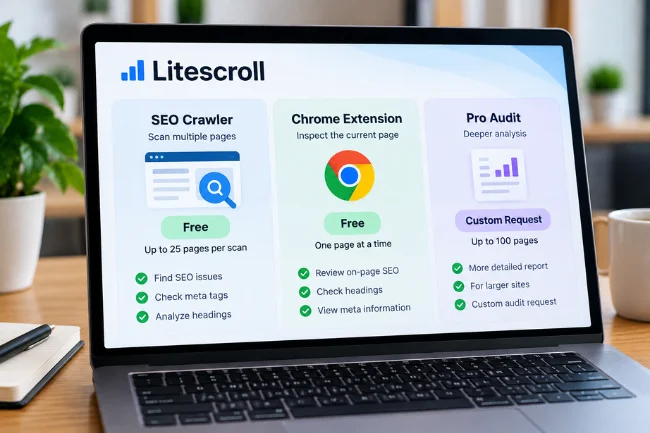
LiteScroll.com is a small SEO toolkit with three parts: a free website crawler, a Chrome extension called SEO Inspector, and a request-based Pro SEO Audit. It is aimed at website owners, bloggers, freelancers and small SEO teams who want quick answers about titles, headings, canonicals and images without learning heavy software.
The short answer on cost: the crawler scans up to 25 pages per scan for free, the Inspector extension is free, and the Pro audit is a custom request with no published price. This guide explains what each tool does, how to start, where the limits are, and who will get the most from it.
Key Takeaways
- LiteScroll offers a free SEO Crawler (up to 25 pages per scan) and a free Chrome SEO Inspector extension.
- The Pro SEO Audit covers up to 100 pages, but it is a custom request, not a subscription, and no fixed price is published.
- The tools check basics: metadata, headings, canonicals, indexability, images, links, schema and social tags.
- The Inspector is installed manually from a ZIP file in Chrome Developer mode, not from the Chrome Web Store.
- LiteScroll is a lightweight option for small sites. Large or complex sites will need a deeper crawler.
- No SEO tool, including this one, can guarantee rankings. Treat reports as a to-do list, not a promise.
What Is LiteScroll.com?
LiteScroll.com describes itself as a platform for free website crawling, Chrome-based page inspection and simple SEO reports. It is built around one workflow: crawl the site, find the problem pages, then inspect those pages one by one.
That workflow maps to three tools. The crawler looks across a site, the Inspector looks at the page open in your browser, and the Pro audit is a deeper review you request when the free tools are not enough.
Good to KnowSimilarly named open-source JavaScript scroll libraries exist, such as lit-scroll on npm. They are separate projects. This article covers only the SEO tools on litescroll.com.
LiteScroll SEO Tools at a Glance
Tool |
What it does |
Cost |
Scope |
|---|---|---|---|
SEO Crawler |
Scans a website and reports common SEO issues |
Free |
Up to 25 pages per scan |
SEO Inspector |
Chrome extension that checks the current page |
Free |
One page at a time |
Pro SEO Audit |
Deeper review with priority fix recommendations |
Custom request, no published price |
Up to 100 pages (audit request) |
How the LiteScroll SEO Crawler Works
The crawler is the main site-audit tool. You enter a website URL, it scans up to 25 pages, and it returns a report with page-level issues and a suggested order for fixing them.
What the crawler checks
- Metadata: title tags and meta descriptions, including missing or weak ones.
- Headings: H1 usage and heading structure.
- Indexing signals: canonical URLs, noindex directives and indexability.
- Images: missing alt text and related image signals.
- Links and content: link checks and common content issues.
Reports can be downloaded as a printable PDF or as CSV, which is handy for sharing with a developer or client.
How to run your first crawl
- Open the LiteScroll SEO Crawler page.
- Enter your website URL and start the free crawl.
- Wait for the report, then sort the findings by severity.
- Fix critical problems first, then work through metadata and image warnings.
- Export the report so you can track what you have fixed.
Pro TipRead the individual findings, not just the overall score. A score only reflects the checks built into the tool. It does not predict how a page will rank.
What the LiteScroll SEO Inspector Checks
The Inspector is a Chrome extension for the page you are looking at right now. LiteScroll lists these checks:
- Meta title and description
- Headings from H1 to H6
- Internal and external links, including nofollow
- Images and alt text
- Schema (JSON-LD and Microdata), Open Graph and Twitter/X card tags
- Target keyword placement
- Technical signals such as viewport, language, HTTP status and robots tags
It also lets you copy the heading structure, copy a page summary, export JSON, and export an HTML or PDF-style report. That saves time when you review several pages or write up findings for someone else.
How to install it
At the time of writing, the extension is offered as a ZIP file (version 0.3.3 on the download page). LiteScroll says this is the route until it is available on the Chrome Web Store.
- Download the ZIP from the official download page.
- Extract the ZIP. You need the extracted folder, not the ZIP itself.
- Open chrome://extensions/ in Chrome and switch on Developer mode.
- Click Load unpacked and select the extracted folder.
WarningMany unrelated extensions called “SEO Inspector” exist in the Chrome Web Store, made by different developers. Download LiteScroll’s version only from litescroll.com. Extensions loaded this way skip the Web Store listing, so only install software from sources you trust.
LiteScroll Pricing: Free vs. Pro Audit
LiteScroll does not use the usual Free, Pro and Enterprise subscription tiers. Its pricing page presents free tools first and a Pro audit by request.
Feature |
LiteScroll Free |
Pro SEO Audit |
|---|---|---|
Price |
$0 |
Custom; no fixed price published |
Crawler |
Up to 25 pages per scan |
Audit request for up to 100 pages |
Page inspection |
Free Chrome extension |
Deeper technical and on-page review |
Output |
Reports and exports |
Priority fix recommendations |
Best for |
Quick checks, small sites, blogs |
Larger sites and client projects |
How the Pro audit request works
The request form asks for your name, email and website URL. You also choose an audit size (25, 50 or 100 pages, or “not sure”), a website type, and what you want checked.
LiteScroll’s terms say that sending a request does not guarantee acceptance, delivery, ranking improvement or fixed pricing. Scope, timeline and any cost are confirmed separately if the audit goes ahead.
Important NoteBecause no price is published, ask for a written quote and a list of deliverables before you agree to anything. Run the free crawler first so you know what you actually need reviewed.
How LiteScroll Helps Website Owners
These are example scenarios based on what the tools are designed to do, not claims about results.
Checking a post before you publish
Open the draft or live page and launch the Inspector. In a couple of minutes you can confirm there is one H1, the heading order makes sense, the meta description exists, the canonical URL is correct, and images have alt text.
Auditing a small business website
A site with 15 to 25 pages fits inside one free crawl. Run it, export the report, and hand the critical items to whoever manages the site. Missing descriptions and duplicate or missing titles are quick wins.
Taking a first look at a site as a freelancer
A free scan of a prospect’s site gives you a starting list of issues before a deeper conversation. Use it as a first look, not as a full technical audit.
LiteScroll vs. Screaming Frog
Screaming Frog SEO Spider is the best-known desktop crawler, so it is a fair benchmark. The two tools overlap in basic crawling but differ a lot in depth.
Point |
LiteScroll |
Screaming Frog SEO Spider |
|---|---|---|
Free crawl limit |
25 pages per scan |
500 URLs |
Paid option |
Custom Pro audit request |
Annual licence (listed at £199 per year) |
How you use it |
Enter a URL on the website; Chrome extension for single pages |
Desktop app for Windows, macOS and Linux |
Advanced features |
Not listed on LiteScroll’s pages |
Licence unlocks configuration, custom extraction and JavaScript rendering |
Focus |
Simple, common issues |
In-depth technical audits (over 300 issues checked) |
In plain terms, LiteScroll aims to be quick and easy, while Screaming Frog gives experienced SEOs far more control. They solve different problems, and many people would use a lightweight tool for quick checks and a deeper one for serious audits.
Limitations to Know Before You Rely on It
- The 25-page cap: sites with more pages will only be partly covered by a free scan.
- Manual extension install: Developer mode and “Load unpacked” add friction for non-technical users, and updates are not automatic through the Web Store.
- No published Pro price: there is no self-service paid tier on the pages I reviewed, only a custom request.
- Unclear ownership: I did not find a named company or person behind LiteScroll on the pages I reviewed, and an independent review noted the same. A contact email, [email protected], is listed on its disclaimer page.
- Short track record: there is little independent testing of these tools so far.
Good to KnowThe site’s blog currently lists posts on many unrelated topics, such as property, trading and vehicle accessories, and a third-party marketplace listing advertises paid guest posts on the domain. This does not change how the tools work, but it is a reason to rely on LiteScroll’s tool reports rather than its non-SEO blog content.
Who LiteScroll Suits (and Who Needs More)
A good fit |
Look at a deeper crawler instead |
|---|---|
Small business sites and portfolios |
Large ecommerce sites |
Bloggers checking posts before publishing |
Sites with thousands of URLs |
SEO beginners learning the basics |
Advanced technical investigations |
Freelancers doing quick first looks |
Custom extraction or heavy crawl configuration |
Quick-Start Checklist
- Run the free crawler on your homepage URL.
- Export the report and sort issues by severity.
- Fix missing or duplicate titles and meta descriptions first.
- Make sure each page has a single, clear H1.
- Add alt text to meaningful images.
- Check canonical and noindex settings on important pages.
- Install the Inspector only from litescroll.com, if you want page-level checks.
- Re-crawl after your fixes to confirm the issues are gone.
- Request a Pro audit only if you need more than 25 pages or help prioritizing.
Official Links and Resources
- LiteScroll SEO Crawler
Runs the free 25-page scan. Useful for small sites and bloggers. Limit: 25 pages per scan. - LiteScroll SEO Inspector download
The extension ZIP and install steps. Useful for page-by-page checks. Limit: manual installation. - LiteScroll pricing page
Shows what is free and what is custom. Check it for current terms. - Pro SEO Audit request
The form for deeper audits. Pricing is not shown up front. - Screaming Frog SEO Spider
A deeper desktop crawler for larger or technical audits. Free up to 500 URLs; learning curve is steeper.
Frequently Asked Questions
What is LiteScroll.com?
LiteScroll.com is an SEO toolkit with a free website crawler, a Chrome extension called SEO Inspector, and a request-based Pro SEO Audit. It focuses on common technical and on-page SEO checks.
Is LiteScroll free to use?
The crawler (up to 25 pages per scan) and the Inspector extension are free. The Pro SEO Audit is a custom request with no published price.
How many pages can the LiteScroll SEO Crawler scan?
The free scan covers up to 25 pages. For larger sites, LiteScroll points users to a Pro SEO Audit request of up to 100 pages.
What does the LiteScroll SEO Inspector check?
It checks the current page’s title, meta description, headings, links, images, schema, social tags and keyword usage, plus technical signals such as robots tags and HTTP status.
How do I install LiteScroll SEO Inspector in Chrome?
Download the ZIP from litescroll.com, extract it, open chrome://extensions/, turn on Developer mode, click Load unpacked, and choose the extracted folder.
How much does the LiteScroll Pro SEO Audit cost?
No fixed price is published. You submit a request, and scope, timeline and any pricing are confirmed separately. Ask for a written quote first.
Is LiteScroll the same as the lit-scroll JavaScript library?
No. Open-source scroll libraries with similar names exist, but they are separate from the SEO tools on litescroll.com, and I found no sign that they are connected.
Can LiteScroll guarantee better Google rankings?
No. LiteScroll’s own disclaimer says a Pro audit request does not guarantee ranking improvement. Use the reports to find and fix issues, not as a promise of results.
Conclusion
LiteScroll.com is a straightforward, free way to check the SEO basics on a small website: a 25-page crawler for the whole site, and a Chrome extension for single pages. The Pro audit exists for deeper work, but without a published price you should get a quote first.
My recommendation: run one free crawl, fix the critical issues, and keep the Inspector for pre-publish checks. If your site is large or technically complex, pair it with, or choose, a deeper crawler. Either way, install the extension only from the official site and treat every report as a guide, not a guarantee.
