
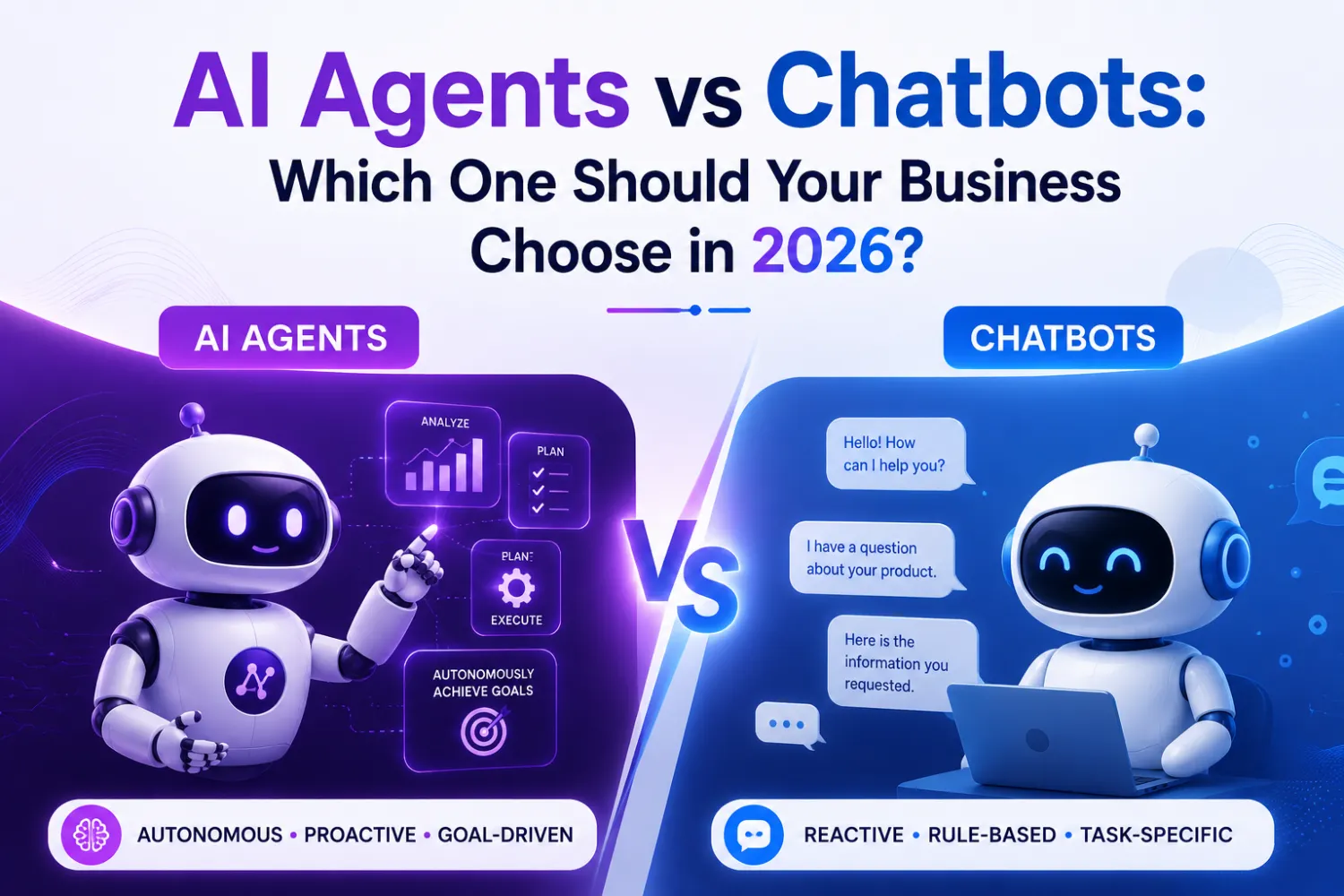
Businesses often use “AI chatbot” and “AI agent” as if they mean the same thing, but the distinction affects what you can automate, how much control you need, and what you will spend. A chatbot mainly responds to prompts, while an agent can coordinate tools, make decisions within defined limits, and complete multi-step tasks.
A chatbot helps you communicate; an AI agent helps you execute so choose based on whether you need answers, actions, or both. The right option depends on your workflows, data, risk tolerance, and expected return.
This guide compares how each technology works in practice, where each creates business value, and what you should consider for security, governance, implementation, and long-term automation plans in 2026.
Core Definitions And Operating Models
You can distinguish chatbots from AI agents by examining how they respond, access information, use tools, and pursue outcomes. A chatbot primarily manages conversation, while an AI agent can coordinate multiple steps to complete a defined business objective.
What Constitutes A Chatbot
A chatbot is software designed to interact with you through text or voice. Traditional chatbots use rules, intent classification, entity extraction, and decision trees to select a response from predefined flows. They work well for predictable requests, such as checking an order status, answering common policy questions, or routing a support ticket.
Modern chatbots may use a large language model to generate natural-sounding replies. This improves their ability to interpret varied wording and summarize information, but it does not automatically make them agents. If the system only retrieves information and responds without independently planning or taking meaningful actions, you are still using a chatbot or conversational assistant.
Your chatbot can connect to a knowledge base, customer records, or search tools. However, its operating model generally remains request-response: you ask for something, it produces an answer, and the interaction ends or waits for your next instruction.
What Constitutes An AI Agent
An AI agent combines a language model or other reasoning system with instructions, business context, tools, and an execution loop. You give it an objective, and it can interpret the request, break the work into steps, select appropriate tools, evaluate results, and continue until it reaches a stopping condition.
For example, an employee-onboarding agent might verify required documents, create accounts through approved systems, notify relevant teams, and record completion. It may use APIs, databases, workflow platforms, browsers, or internal applications rather than relying only on a conversational answer.
Agents still operate within limits. You define their permissions, available tools, data access, approval requirements, and escalation paths. A reliable agent should also maintain an audit trail, handle failed actions, and request human approval before high-impact steps such as issuing refunds, changing contracts, or modifying production systems.
The Role Of Autonomy And Goal Completion
Autonomy describes how much work the system can perform without step-by-step prompting. A chatbot usually waits for each request and responds within a narrow interaction. An agent can manage a sequence of actions after you provide a broader goal, such as resolving a billing discrepancy or preparing a sales report.
Goal completion requires more than generating text. The agent must identify the desired outcome, track task state, use tools correctly, verify whether actions succeeded, and adapt when conditions change. You should measure completion against a business result, not conversational fluency.
Autonomy also increases operational risk. Set clear boundaries around permissions, spending, data handling, and irreversible actions. Use human review where errors could affect customers, finances, compliance, security, or company records.
How The Technologies Differ In Practice
A chatbot mainly manages a conversation and provides information in response to prompts. An AI agent can interpret a goal, choose actions, use connected systems, and continue working until it completes the task or reaches a decision point.
Conversation Versus Task Execution
A chatbot typically answers questions, retrieves approved information, or guides you through a defined dialogue. For example, a customer might ask about a return policy, and the chatbot can provide the relevant terms or direct the customer to a support form.
An AI agent handles a broader objective. If you ask it to resolve a delayed order, it might identify the order, check shipping data, review the company’s policy, offer eligible options, and create a replacement request. It does not simply produce a reply; it performs steps across a process.
The distinction depends on system design, not the product label. A chatbot connected to business tools may complete transactions, while an “agent” with no tool access may function only as a conversational assistant.
Workflow Orchestration And Tool Use
Chatbots usually follow predefined flows or answer from a knowledge base. They may transfer you to an employee when your request falls outside their supported paths.
Agents can coordinate multiple tools and systems. Depending on their permissions, they might query a CRM, update a ticket, check inventory, generate a report, or send a message. They can select the next action based on the information returned by each tool rather than following one fixed script.
This flexibility requires controls. You should define permitted actions, approval thresholds, authentication requirements, and audit logs. For example, an agent might draft a refund automatically but require employee approval before issuing a payment.
Memory, Context, And Adaptation
A chatbot often uses the current conversation and, in some implementations, a small set of stored customer details. Its responses may become less useful when a request depends on earlier interactions, changing account data, or information from another system.
An agent can combine conversation history with structured records, company policies, and results from live tools. It may remember preferences when your system permits that use, maintain task state, and adapt its plan when conditions change.
You still need to distinguish context from durable memory. Context supports a current task, while memory stores information for later use. Set retention rules, access controls, and deletion processes so the system does not preserve sensitive data unnecessarily or apply outdated information.
Business Use Cases By Capability
Your choice depends on task complexity, system access, and the level of human oversight you need. Chatbots work well for predictable conversations, while AI agents can coordinate multi-step work across business tools.
Customer Service And Self-Service
Use a chatbot for routine questions with clear answers, such as business hours, shipping policies, password instructions, or return eligibility. It can guide customers through predefined menus, retrieve approved content, and transfer conversations when the request falls outside its rules.
Use an AI agent when support requires investigation or action across several systems. An agent might verify an order in your commerce platform, check inventory, apply an approved refund, update the customer record, and send a confirmation. You should limit its permissions, require approval for sensitive actions, and keep an audit trail.
Agents can also summarize conversations, classify cases, suggest replies, and route complex issues to the right team. Human representatives should handle disputes, vulnerable customers, unusual requests, and decisions involving significant financial or regulatory risk.
Sales Operations And Lead Management
A chatbot can qualify website visitors by asking fixed questions about company size, needs, budget, and timing. It can answer product questions from approved materials, schedule meetings, and send captured details to your CRM.
An AI agent can manage a broader workflow. It can research an account using permitted data, identify relevant contacts, assess fit against your criteria, draft personalized outreach, update CRM fields, and create follow-up tasks. You should require review before sending external messages or changing opportunity stages.
Agents also help sales teams by summarizing calls, extracting commitments, generating proposals from approved templates, and alerting representatives when leads show buying intent. Connect them only to reliable data sources, and define rules for consent, pricing, and claims about your products.
Back-Office Process Automation
Chatbots can answer employee questions about expenses, leave policies, procurement rules, and internal procedures. They reduce repetitive requests when the underlying information stays current and the process requires little judgment.
AI agents suit workflows that involve multiple applications and conditional steps. For example, an agent can read an invoice, match it against a purchase order, check approval limits, enter data into an accounting system, and flag discrepancies for review. It can also reconcile selected records, prepare reports, or open service tickets.
Start with low-risk, repeatable processes and measure accuracy, processing time, exception rates, and human interventions. Keep approval gates for payments, hiring decisions, access changes, compliance actions, and any operation that could create material financial or legal consequences.
Value, Costs, And Return On Investment
Your choice should match the work you need to automate, the level of system access required, and the value of faster service. Chatbots usually reduce repetitive support work, while AI agents can coordinate multi-step processes when you provide suitable controls and reliable data.
Efficiency And Service Quality Gains
A chatbot can answer frequently asked questions, guide users through fixed workflows, collect basic information, and route complex cases to employees. This can reduce queue volumes and provide consistent responses outside business hours.
An AI agent can handle broader processes, such as checking an order, updating a customer record, issuing an approved refund, or scheduling a service appointment across connected systems. It can interpret less-structured requests and decide which permitted action to take, but you should restrict access and require approval for sensitive decisions.
Measure service quality as well as speed. Useful indicators include first-response time, resolution time, containment rate, transfer rate, error rate, customer satisfaction, and employee handling time. Faster responses have limited value if the system gives inaccurate answers or creates additional work.
Implementation And Operating Costs
Chatbots generally cost less because they use narrower conversation flows, fewer integrations, and simpler testing. Your costs may include platform fees, conversation design, knowledge-base preparation, integration work, analytics, maintenance, and human support for escalated cases.
AI agents usually require more investment. You may need orchestration software, model usage, retrieval systems, permissions, monitoring, integration with business applications, evaluation datasets, security reviews, and fallback procedures. Costs also increase when an agent must operate across several systems or handle exceptions.
Published estimates vary widely, so treat figures such as £8,000 for a basic chatbot or £35,000 and above for an AI-agent deployment as rough project ranges rather than standard prices. Request a total-cost estimate that separates setup, recurring software, usage, maintenance, and oversight.
Measuring Business Impact
Build a baseline before deployment. Record current ticket volume, average handling time, staffing costs, conversion rates, processing errors, escalations, and customer retention for the process you plan to change.
Calculate return on investment with both savings and added revenue:
ROI = (annual benefits − annual operating costs − implementation costs) ÷ implementation costs × 100
Include measurable benefits such as reduced handling time, fewer avoidable contacts, faster order processing, improved appointment completion, or increased sales conversion. Subtract model usage, integration maintenance, quality checks, employee training, and remediation costs.
Run a controlled pilot with clear limits and compare results with a similar group that still uses the existing process. Review performance by request type, customer segment, and escalation reason rather than relying on one average figure.
Risk, Governance, And Security Requirements
Your risk controls should match the system’s autonomy. A chatbot mainly generates responses, while an AI agent may retrieve records, modify data, send messages, or trigger transactions. Strong permissions, data controls, auditability, and defined human intervention points become essential as an agent gains access to more systems.
Permissions And Human Oversight
Give each agent only the permissions required for its assigned tasks. Use separate service identities, role-based access controls, short-lived credentials, and explicit limits on which records, applications, and actions the agent can access. Avoid shared accounts that make activity difficult to attribute.
Classify actions by risk:
- Low risk: searching internal documentation or drafting text
- Moderate risk: updating a support ticket or preparing a purchase order
- High risk: issuing refunds, changing financial records, deleting data, or sending external commitments
Require human approval for high-impact or irreversible actions. Record the agent’s instructions, tools used, decisions, approvals, and resulting changes so you can investigate incidents and review performance. Monitor for unauthorized tool use, unusual access patterns, and attempts to bypass approval rules.
Data Protection And Compliance
Define which data the agent may collect, retain, retrieve, and transmit. Do not allow sensitive information to flow into prompts, logs, vector databases, or third-party model providers without an approved purpose and suitable contractual protections. Apply encryption in transit and at rest, retention limits, access controls, and deletion procedures.
You should identify whether the agent handles personal, financial, health, confidential, or regulated information. Map those activities to applicable requirements, such as privacy notices, access requests, data residency, audit records, and breach reporting. Redact or tokenize sensitive fields when the task does not require the original values.
Review connected tools and vendors before deployment. A model provider may not be the only data processor; plugins, document stores, monitoring platforms, and integration services can also receive agent data. Test retrieval controls to prevent one user or department from receiving information outside its authorization.
Reliability, Errors, And Escalation Paths
Treat agent output as fallible, especially when the system must interpret ambiguous requests or act across several applications. Test common tasks, edge cases, permission failures, stale data, prompt injection, duplicate requests, and unavailable services before granting write access.
Set measurable controls such as confidence thresholds, allowed action types, transaction limits, and timeouts. Require the agent to cite its source records when answering from internal data, and prevent it from presenting an unverified assumption as a completed action. Use idempotency checks to reduce duplicate emails, payments, or updates.
Create an escalation path that routes uncertain, unsafe, or failed tasks to a named team. Provide a visible stop mechanism, preserve relevant logs, and support rollback where possible. Review incidents and near misses regularly, then update prompts, policies, permissions, tests, or workflows based on the findings.
Selecting The Right Approach
Choose based on task complexity, system access, risk, and the level of human oversight you need. A chatbot suits predictable conversations, an AI agent fits multi-step work, and a hybrid model combines fast self-service with controlled automation.
When A Chatbot Is The Better Fit
Choose a chatbot when users need quick answers from a defined knowledge base. Common examples include product FAQs, order-status checks, store hours, appointment scheduling, and basic troubleshooting.
A chatbot works well when you can map requests to clear intents, approved responses, and limited workflows. You can improve performance by connecting it to current help-center content, setting fallback messages, and routing uncertain or sensitive cases to employees.
Chatbots also make sense when you need predictable behavior and straightforward testing. They usually require less integration work than agents and can operate with narrower permissions. This approach fits high-volume, low-risk interactions where customers do not expect the system to make complex decisions.
When An AI Agent Is Justified
Use an AI agent when completing a request requires several steps across business systems. For example, an agent might investigate a billing issue, check account history, apply an eligible credit, update a CRM record, and notify the customer.
An agent becomes worthwhile when it can produce measurable savings or improve completion times enough to justify its added complexity. Define the agent’s tools, permissions, approval requirements, and escalation rules before deployment.
You should also provide reliable data and monitor every action. Keep human approval for high-impact decisions involving refunds above a threshold, account access, legal commitments, employment, or other regulated processes. An agent should not receive broad system access simply because it can use tools.
When A Hybrid Model Works Best
A hybrid model works when you need efficient self-service but cannot automate every case safely. A chatbot can answer routine questions and collect essential details, while an AI agent handles eligible multi-step tasks after the conversation establishes the customer’s intent.
You can also use a hybrid design that lets the chatbot manage common paths and transfers complex work to an agent or employee. For example, the chatbot might identify a delivery problem, the agent might review tracking and replacement rules, and an employee might approve an exception.
Set clear handoff conditions, preserve the conversation history, and show users when automation changes. Track containment, successful task completion, escalation rates, errors, and customer satisfaction separately so you can identify whether each component performs its intended role.
Implementation Priorities For 2026
Successful deployments depend on prepared workflows, measurable pilots, reliable system connections, and controls that match the level of autonomy you allow. You should improve the underlying process before adding automation, then expand only after testing accuracy, cost, security, and human oversight.
Process Readiness And Integration Planning
Start by selecting a workflow with a clear business owner, defined inputs, and measurable outputs. Document the current process, including approval steps, exceptions, data sources, service-level targets, and escalation rules. An agent cannot reliably improve a process that changes from case to case without documented decision criteria.
Map every required integration before development begins. Identify the systems the solution must read from or write to, such as CRM, inventory, ticketing, billing, or identity platforms. Use scoped permissions, secure APIs, audit logs, and structured data wherever possible. A chatbot may only need access to approved content, while an agent may require transaction access, which creates greater operational and security risk.
Choose automation boundaries explicitly. Keep high-impact actions such as refunds, account changes, hiring decisions, or regulated communications subject to human approval until the system demonstrates consistent performance.
Pilot Design And Evaluation Criteria
Design a pilot around one narrow workflow rather than a broad promise to automate an entire department. Define the user group, transaction volume, operating hours, permitted actions, fallback process, and pilot duration. Compare results with a baseline, such as resolution time, first-contact resolution, completion rate, cost per case, or employee hours saved.
Evaluate more than response quality. Track factual accuracy, task completion, unauthorized actions, escalation quality, latency, cost per interaction, and user satisfaction. Test normal cases, incomplete requests, conflicting records, adversarial inputs, and unusual exceptions. Review a representative sample manually and record the reason for every failure.
Set continuation thresholds before launch. For example, require a minimum completion rate, zero critical security incidents, and a defined accuracy level for high-risk tasks. If the system misses those thresholds, narrow its permissions, improve the workflow or data, and repeat testing instead of scaling prematurely.
Scaling With Responsible Controls
Scale in stages: begin with retrieval and drafting, add recommendations, and introduce transactional actions only after the system passes controlled evaluations. Grant the least privilege necessary, separate planning from execution, and require confirmation for irreversible or high-value actions. Maintain a complete record of prompts, retrieved information, tool calls, approvals, outputs, and final outcomes.
Assign clear ownership across operations, security, legal, compliance, and IT. Review access rights, vendor contracts, data retention, model changes, and incident procedures on a regular schedule. Monitor drift by comparing current performance with the pilot baseline and investigate increases in errors, escalations, cost, or user complaints.
Give employees a practical override and feedback mechanism. Your staff should know when to trust the system, when to verify its work, and how to stop an incorrect action. This operating model lets you expand useful automation without treating autonomy as a substitute for accountability.
The Strategic Outlook For Business Automation
In 2026, you should treat chatbots and AI agents as complementary tools rather than interchangeable products. A chatbot handles conversations, answers common questions, and follows defined workflows. An AI agent can interpret a goal, plan multiple steps, use connected systems, and complete tasks with less direct prompting.
Your choice should depend on workflow complexity, risk, and required system access:
Business need |
Better fit |
|---|---|
FAQs and basic support |
Chatbot |
Guided forms or scripted requests |
Chatbot |
Cross-system research and updates |
AI agent |
Multi-step service operations |
AI agent with controls |
Sensitive approvals or regulated decisions |
Human-led workflow |
You can gain more value by combining both approaches. A chatbot can manage the customer conversation, while an agent works behind the scenes to retrieve records, update a CRM, prepare a response, or route an exception to an employee.
Successful adoption requires more than selecting a capable model. You need reliable data, clearly defined permissions, monitoring, audit trails, and human review for high-impact actions. Start with a measurable process, limit the agent’s access, and expand its responsibilities as it demonstrates consistent performance.
This approach also helps you manage cost. Use simpler conversational automation for predictable requests, and reserve agent-based systems for tasks where planning, tool use, or cross-system coordination creates measurable operational value.
Conclusion
You should choose the technology that matches the work you need to automate. A chatbot works well for FAQs, basic guidance, and structured conversations. An AI agent fits processes that require planning, tool access, decisions, and actions across business systems.
Your priority |
Better fit |
|---|---|
Answering recurring questions |
Chatbot |
Guiding users through fixed steps |
Chatbot |
Completing multistep tasks |
AI agent |
Updating records or triggering workflows |
AI agent |
Maintaining human approval for sensitive actions |
Either, with suitable controls |
You may also combine both approaches. A chatbot can handle common questions and route complex requests to an agent or human employee, while the agent operates within defined permissions, approval rules, and monitoring systems.
Before you invest, assess task complexity, integration requirements, data sensitivity, operating costs, and the level of human oversight you need. Start with a measurable use case, define success criteria, and expand only after the system performs reliably.
