
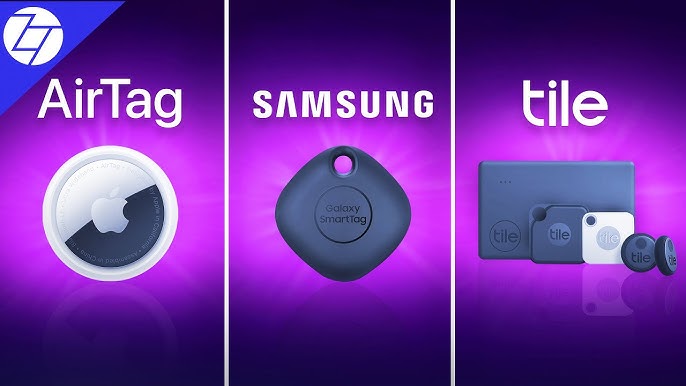
There’s a specific kind of panic that sets in when you can’t find your keys five minutes before you need to leave, or when your luggage doesn’t show up on the carousel after a flight. Bluetooth trackers exist to take the guesswork out of those moments, and over the past few years, three names have come to dominate the category: Apple’s AirTag, Tile, and Samsung’s SmartTag.
On the surface, they all do the same basic thing attach a small tracker to an item, and use a smartphone app to locate it if it goes missing. But the way each one actually works under the hood, and how well it performs depending on what phone you use, differs enough that picking the “best” one really depends on your specific situation. This guide breaks down how each tracker works, where they genuinely differ, and which one makes the most sense depending on your phone, your habits, and what you’re actually trying to keep track of.
How Bluetooth Trackers Actually Work
Before comparing the three, it helps to understand the basic mechanism they all rely on. Bluetooth trackers don’t have their own GPS or cellular connection they’re small, low-power Bluetooth beacons. When a tracker is within Bluetooth range of your own phone, it shows up directly in the app with a fairly precise location. When it’s out of range, the tracker relies on a “finder network” essentially, any other user’s phone running the same tracker’s app that happens to pass within Bluetooth range of your lost item. That nearby phone anonymously relays the tracker’s location back to you, without the other person ever knowing.
This means a tracker’s real-world usefulness depends heavily on the size of its finder network. A tracker with millions of active devices in the wild will locate a lost item in a crowded city far more reliably than one with a smaller user base, simply because there are more phones passing by to “see” it.
Apple AirTag
AirTag benefits from arguably the largest finder network in the world, since it taps into Apple’s Find My network, which includes every iPhone, iPad, and Mac with Find My enabled regardless of whether that person owns an AirTag themselves.
Key features:
- Precision Finding using Ultra Wideband on newer iPhones, showing exact distance and direction to the item
- Massive Find My network coverage through the existing base of Apple devices
- Simple setup, tapping the AirTag against an iPhone
- Anti-stalking protections, alerting iPhone users if an unknown AirTag is traveling with them
Limitations:
- Requires an iPhone for full functionality; Android users have a much more limited experience through a separate “Tracker Detect” app
- No built-in keyring hole, requiring a separate accessory to attach it to keys or bags
- Battery isn’t rechargeable, requiring a coin cell replacement every year or so
Best for: iPhone users who want the most reliable finder network and the most precise short-range location finding available.
Tile
Tile was the original mainstream Bluetooth tracker on the market, and it remains the most cross-platform-friendly option of the three, working equally well for both Android and iPhone users.
Key features:
- Full functionality on both Android and iOS, unlike AirTag’s iPhone-favored design
- A range of form factors, including slim wallet cards, key-shaped trackers, and stickers
- Tile Premium subscription adds features like a 30-day location history and a “Notify When Found” alert
- Integration with Amazon’s Sidewalk network, extending its finder network beyond just Tile app users
Limitations:
- Finder network is meaningfully smaller than Apple’s Find My network, since it depends on active Tile app users
- No Ultra Wideband precision finding — relies on Bluetooth signal strength, which is less precise at close range
- Some premium features are locked behind a subscription
Best for: Android users, or households with a mix of Android and iPhone users, who want one tracker that works consistently regardless of device.
Samsung SmartTag
Samsung’s SmartTag is built specifically around the Galaxy ecosystem, tapping into Samsung’s SmartThings Find network, which includes the substantial base of Galaxy phones in use worldwide.
Key features:
- Ultra Wideband precision finding on newer SmartTag+ models, similar in concept to AirTag’s Precision Finding
- Integration with SmartThings for broader smart home compatibility
- Compass-guided AR view to help pinpoint an item’s exact location
- Available in multiple form factors, including a version with a built-in keyring hole
Limitations:
- Full functionality is largely limited to Samsung Galaxy devices, with a weaker experience on other Android phones and iPhones
- Finder network, while sizable, is smaller than Apple’s cross-device Find My network
- Precision Finding features are limited to newer Samsung phone models with Ultra Wideband support
Best for: Samsung Galaxy users who want a tracker tightly integrated with their existing phone and smart home ecosystem.
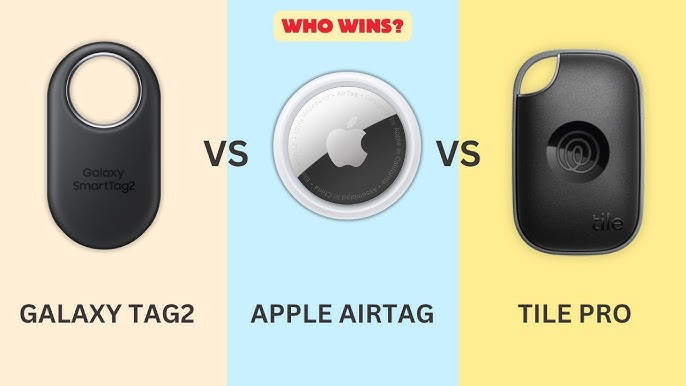
Head-to-Head Comparison
Finder network size: Apple’s Find My network has the clear edge here, simply because it includes every Find My-enabled Apple device, not just AirTag owners. Tile’s network has grown through its Amazon Sidewalk partnership but still trails Apple’s reach. Samsung’s SmartThings Find network is strong within the Galaxy ecosystem but doesn’t extend to non-Samsung devices in any meaningful way.
Cross-platform compatibility: Tile wins decisively here, since it was built from the ground up to work equally well on Android and iOS. AirTag technically works with Android through a limited detection app, but it’s designed primarily for iPhone users. SmartTag sits in a similar spot to AirTag, but for the Samsung ecosystem specifically.
Precision finding: AirTag and SmartTag+ both offer Ultra Wideband-based precision finding, giving a genuinely useful distance-and-direction display when you’re close to the item. Tile relies on Bluetooth signal strength alone, which gets you in the general vicinity but isn’t as precise for pinpointing an item in, say, a couch cushion or under a car seat.
Battery life and replacement: All three use replaceable coin cell batteries lasting roughly a year under normal use, though actual battery life varies slightly based on how often the tracker refreshes its location and whether precision finding features are used frequently.
Anti-stalking protections: All three companies have added protections against using their trackers for covert stalking, including unwanted tracker alerts on nearby phones. Apple’s protections are the most mature and widely tested at this point, given AirTag’s scale and the scrutiny it has received, though Tile and Samsung have both added their own detection and alert systems as well.
Price: Tile tends to offer the most flexibility in pricing, with basic trackers often priced lower than AirTag, though Tile Premium’s subscription adds ongoing cost for its full feature set. AirTag and SmartTag are generally priced similarly to each other for a single tracker, with better per-unit pricing when purchased in multi-packs.
Which One Should You Actually Buy?
The honest answer depends almost entirely on what phone you use and who else in your household or item-lending circle uses which phone.
- If you have an iPhone, AirTag is the clear choice. The Find My network’s size and Precision Finding’s usefulness make it hard to beat for iPhone users specifically.
- If you have a Samsung Galaxy phone, SmartTag is a strong, tightly integrated option, particularly if you’re already using other SmartThings-connected devices at home.
- If you’re on Android but not a Samsung device, or if your household mixes Android and iPhone users, Tile is the more practical choice, since it doesn’t favor one operating system over another.
- If you frequently travel or lend items to people with different phones, Tile’s cross-platform consistency also holds an advantage, since you’re not relying on a finder network that skews heavily toward one ecosystem.
It’s also worth noting that mixing and matching based on the item itself can make sense — some people use AirTags for items they personally carry (since their own iPhone will always detect it directly) and a Tile for something they might lend out to friends or family members who don’t use iPhones.
Frequently Asked Questions
1. Can an AirTag be tracked by an Android phone? Only in a limited way. Android users can download Apple’s “Tracker Detect” app to manually scan for nearby AirTags, primarily as an anti-stalking measure, but Android phones don’t contribute to or benefit from Apple’s Find My network the way iPhones do.
2. Does Tile work as well as AirTag for finding lost items? Tile works reliably, but its finder network is smaller than Apple’s Find My network, which means locating a lost item in a crowded area may take longer or be less consistent compared to an AirTag, particularly for iPhone-heavy regions.
3. Do Samsung SmartTags work with iPhones? No, SmartTag is designed specifically for the Samsung Galaxy ecosystem and does not offer meaningful functionality on iPhones or non-Samsung Android devices.
4. How long do the batteries last in these trackers? Most Bluetooth trackers, including AirTag, Tile, and SmartTag, use replaceable coin cell batteries that typically last around a year under normal usage, though frequent use of precision finding features can shorten battery life somewhat.
5. Can these trackers be used to secretly track another person? All three companies have implemented anti-stalking protections that alert nearby smartphone users if an unknown tracker appears to be traveling with them over time, specifically to prevent covert tracking of individuals without their knowledge.
6. Which tracker is best for tracking luggage while traveling? AirTag is often recommended for air travel due to Apple’s extensive global Find My network, which increases the likelihood of location updates even in less common travel destinations, though Tile and SmartTag both work reasonably well in areas with strong device coverage.
7. Do I need a subscription to use these trackers? Basic tracking functionality is free with all three: AirTag, Tile, and SmartTag. Tile offers an optional Premium subscription for additional features like extended location history, while AirTag and SmartTag’s core features are included without a required subscription.
Final Thoughts
There isn’t a single universally “best” tracker among AirTag, Tile, and Samsung SmartTag — the right choice comes down almost entirely to which phone you use and how consistent that ecosystem is across the people you interact with regularly. AirTag makes the most sense for iPhone users thanks to its unmatched Find My network size, SmartTag is the natural fit for Samsung Galaxy owners already embedded in that ecosystem, and Tile remains the most dependable cross-platform option for mixed-device households or Android users outside the Samsung lineup.
If you’re still unsure, matching the tracker to your own primary phone will almost always give you the most reliable results, since your own device plays the biggest role in how quickly and precisely you can locate an item that’s nearby.
